AI Virtual Try On

STYLES

AI Virtual Try On for Real Clothing Preview

AI Virtual Try On is different from a general AI clothes changer. Instead of inventing a random outfit from text, it uses a specific clothing reference image and applies that garment to the person in your uploaded photo. This workflow is useful when you need to see how one real shirt, dress, jacket, hoodie, coat, or outfit may look on a model, customer, influencer, or product photo. It helps ecommerce sellers, fashion brands, content creators, and shoppers create visual previews without arranging a full studio shoot for every clothing item.

How AI Virtual Try On Works

Vidoly AI Virtual Try On combines person detection, garment understanding, and image-to-image outfit replacement. First, the AI identifies the person’s body area, pose, shoulders, arms, torso, and visible clothing boundaries. Then it reads the garment reference image, including shape, color, sleeve type, neckline, fabric texture, pattern, and overall silhouette. Finally, the model adapts the clothing onto the person while aiming to preserve the original face, body posture, lighting direction, and photo composition. The goal is not just to “change clothes,” but to create a try-on preview where the selected garment looks naturally fitted to the uploaded person.

Virtual Try On vs AI Clothes Changer

AI Virtual Try On is best when you already have a clothing item and want to test it on a person. For example, upload a model photo and a product image of a black blazer, floral dress, denim jacket, or streetwear hoodie. AI Clothes Changer is best when you only want to change the outfit style with a text prompt, such as “make this person wear a wedding dress” or “change the outfit to business casual.” In short: AI Virtual Try On = try on a specific garment. AI Clothes Changer = generate a new outfit style.

Best Uses for AI Virtual Try On

1. Ecommerce Product Try-On Online stores can use AI Virtual Try On to preview how a clothing product may look on different models. This is useful for shirts, dresses, jackets, sweaters, coats, pants, and fashion accessories where buyers want to see fit, drape, and styling context. Before publishing, sellers should still review product color, logo placement, fabric details, and any size-sensitive features manually. 2. Fashion Brand Campaign Mockups Fashion teams can create early visual concepts before booking models, photographers, or studios. Upload a campaign portrait and a garment reference to explore whether a new collection item fits the intended model, mood, and visual direction. This helps with pre-production planning, mood boards, social ads, and creative testing. 3. Influencer and Social Media Outfit Preview Creators can preview how a sponsored clothing item may look in their own photo before producing final content. This works well for streetwear, fitness outfits, casualwear, seasonal fashion, and event looks. Use clean full-body or half-body photos for better results, especially when sleeves, waistlines, or pants need to align with the pose. 4. Shopper Try-Before-Buy Preview Users can upload a personal photo and a clothing product image to see whether a garment style suits their body shape, skin tone, and personal aesthetic. The result is a visual reference, not a guaranteed fit or exact tailoring simulation. It is most helpful for comparing color, silhouette, and outfit style before making a purchase decision. 5. Model and Catalog Image Expansion Brands with limited model photography can test one garment across different model images or preview multiple garments on the same model. This can reduce the need for repeated sample shoots during early listing preparation. For final ecommerce use, always check garment accuracy, print details, logo shape, and platform image requirements.

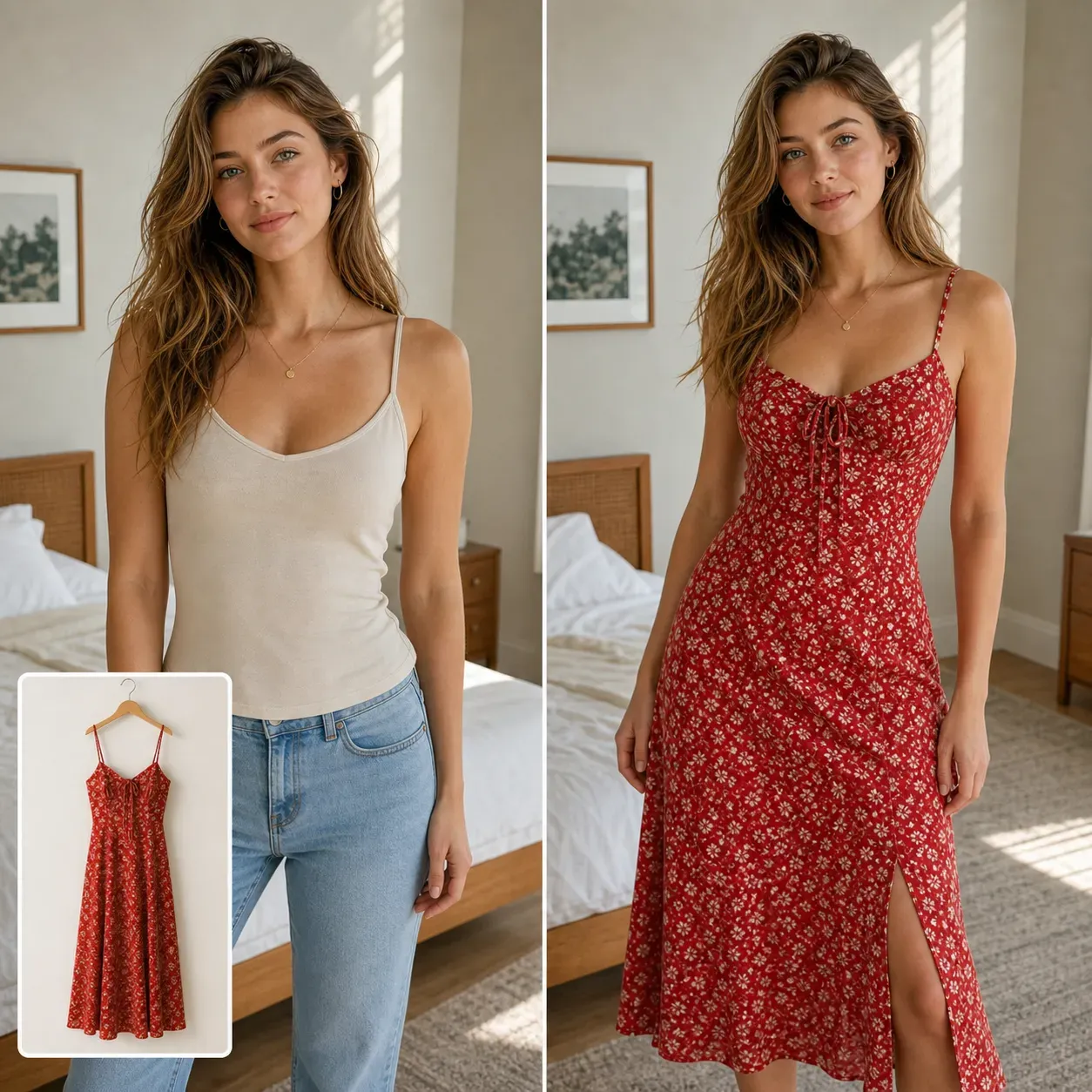
What Photos Work Best for Virtual Try On?

Use a clear front-facing or slightly angled person photo where the body and clothing area are visible. Half-body and full-body shots usually work better than close-up headshots. The garment reference should be clean, well-lit, and show the clothing shape clearly. Flat lay product photos, mannequin shots, or model-worn product images can work, but cluttered backgrounds or folded garments may reduce accuracy. Avoid photos where arms cover most of the clothing area, the body is heavily cropped, or the original outfit has complex accessories that block the garment.

Common Limitations of AI Virtual Try On

AI Virtual Try On creates a visual preview, not a precise tailoring or size measurement tool. It may not perfectly reproduce fabric thickness, exact stitching, small logos, transparent materials, complex lace, reflective textures, or highly detailed prints. Results may be weaker when the person pose is unusual, the garment image is folded, the clothing reference is low-resolution, or the target photo hides important body areas. For commercial product listings, review every result manually before publishing.

How To Use AI Virtual Try On?

1

Upload a person photo

Choose a clear portrait, half-body photo, or full-body image where the clothing area is visible.

2

Upload the clothing reference

Add the garment you want to try on, such as a shirt, dress, hoodie, jacket, coat, or pants.

3

Generate the try-on preview

Vidoly applies the selected clothing to the person while preserving the face, pose, body shape, and photo composition.

4

Review garment details

Check color, neckline, sleeves, logos, patterns, fabric texture, and fit before using the image.

5

Download your try-on image

Save the result for ecommerce previews, fashion planning, social content, or visual comparison.

FAQs

What is AI Virtual Try On?

AI Virtual Try On is an image editing tool that places a specific clothing item onto a person in a photo. It usually requires a person image and a garment reference image.

Is AI Virtual Try On the same as AI Clothes Changer?

No. AI Virtual Try On uses a specific garment reference, while AI Clothes Changer usually creates a new outfit from a text prompt.

Can I upload my own clothing product image?

Yes. You can use a clothing product image as the garment reference. Clear product photos with visible shape, color, and texture usually work best.

Does it work for ecommerce clothing photos?

Yes, it can help create product try-on previews and campaign mockups. For final product listings, manually check garment accuracy, color, logo placement, and platform requirements.

Can I try dresses, hoodies, jackets, and coats?

Yes. AI Virtual Try On can be used for many garment types, including dresses, shirts, hoodies, jackets, sweaters, coats, and casual outfits.

What kind of model photo should I upload?

Use a clear photo where the body area is visible. Front-facing, half-body, or full-body images usually produce better clothing alignment than close-up portraits.

Can it show exact clothing size or fit?

No. The result is a visual preview, not a size calculator or tailoring simulation. It can suggest how a garment may look, but it cannot guarantee real-world fit.

Will it preserve the person’s face and pose?

The tool is designed to keep the person’s identity, face, pose, and general composition while changing the clothing area.

Does it preserve logos and printed patterns?

It can attempt to preserve visible garment details, but small text, logos, dense prints, and complex textures should be checked manually after generation.

Can I use AI Virtual Try On images commercially?

You may use try-on results for commercial workflows if your image sources, garment references, and platform terms allow it. Always check rights for model photos, clothing images, logos, and brand assets before using results in ads or ecommerce listings.