
How to Make Doooot Images and Share Your Visual Attitude Free Online
 By Marvin/1 min read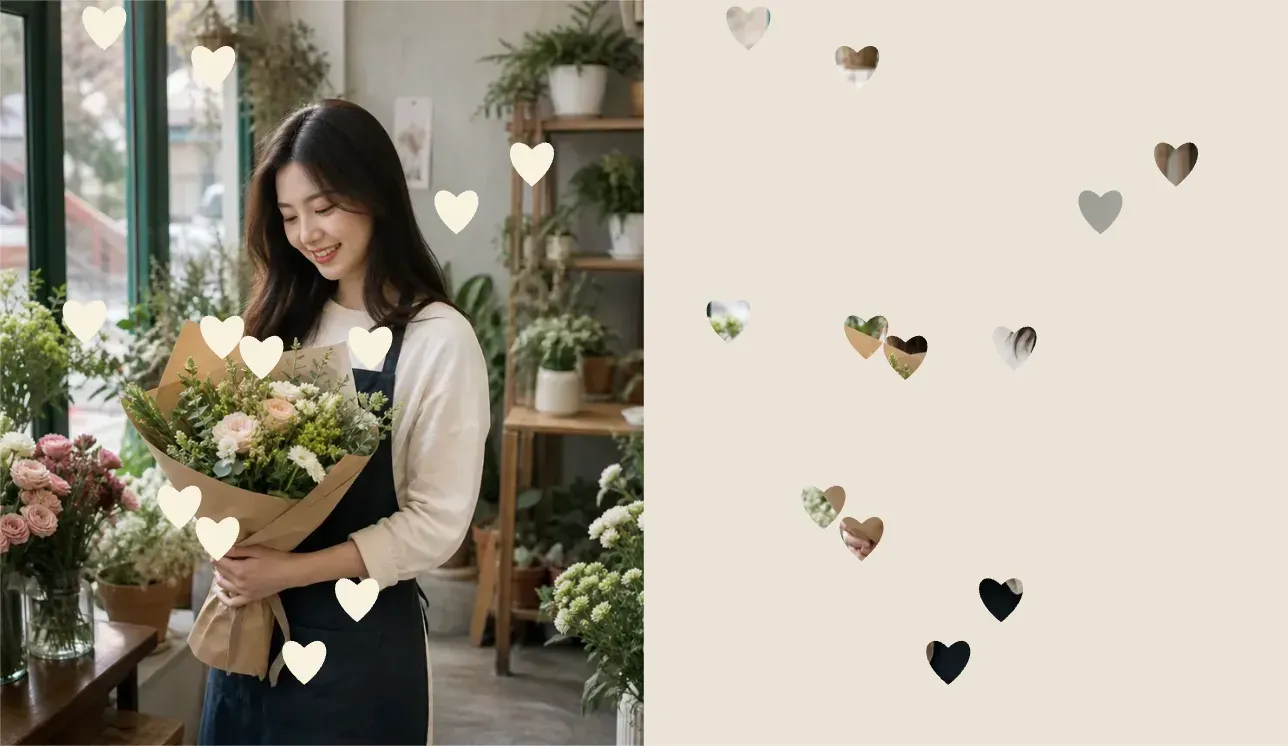
What Is a Doooot Image?
A doooot image is more than a photo with dots. It is a simple way to turn an ordinary picture into something playful, intentional, and instantly shareable.
With Vidoly's Doooot Image Generator, you can upload a photo and add custom dot patterns by changing only a few prompt values. You do not need to write a long AI prompt or manually place every dot. Just choose the number, color, and shape, then generate a new version of your image.
A doooot image is a stylized photo with decorative dots or dot-like shapes added to the original picture. These dots can be round, star-shaped, heart-shaped, water-drop shaped, or customized into other visual forms.
The effect can feel cute, minimal, ironic, dreamy, or bold depending on the photo and the dot style. A portrait with milk-white dots feels soft and clean. A street photo with large white dots feels more graphic and editorial. A couple photo with heart-shaped dots feels romantic and social-media ready.
How to Use Vidoly's Doooot Image Generator
Vidoly makes the process simple with a prompt template. Instead of writing a full prompt from scratch, you only edit the values after each variable.
Generate the doooot image for me.
{dots_number}: 15
{dots_color}: milk white
{dots_shape}: round
Here is what each part means:
- {dots_number}: controls how many dots appear in the image.
- {dots_color}: controls the color of the dots.
- {dots_shape}: controls the dot shape, such as round, star, heart, water drop, bubble, or sparkle.
For example, if you want a clean white-dot look, use:
Generate the doooot image for me.
{dots_number}: 15
{dots_color}: milk white
{dots_shape}: round
If you want something more romantic, try:
Generate the doooot image for me.
{dots_number}: 18
{dots_color}: soft pink
{dots_shape}: heart
If you want a fresh, glossy style, try:
Generate the doooot image for me.
{dots_number}: 16
{dots_color}: transparent white
{dots_shape}: water drop
Step-by-Step Workflow
- Open the Doooot Image Generator.
- Upload a clear photo.
- Start with the default prompt template.
- Change the dot number, color, and shape.
- Generate the image.
- Download your doooot image.
- Share it on Instagram, TikTok, X, Pinterest, Threads, or your profile page.
For best results, use a photo with a clear subject and enough empty space around the person, object, pet, or background. The dots need room to breathe. If the photo is too crowded, the effect may feel messy.
Best Photos for Doooot Images
Doooot images work especially well with:
- Lifestyle portraits
- Street photos
- Couple photos
- Pet photos
- Product shots
- Travel photos
- Mirror selfies
- Cafe photos
- Outfit photos
- Simple landscape images
A strong doooot image usually has one clear focus. The dots should decorate the image, not fight with the subject.
Why Doooot Images Work on Social Media
Social media is full of polished photos, filters, and predictable edits. A doooot image feels different because it adds a small visual interruption. The dots make the image look designed, but still personal.
That is why doooot images work well as a social media format. They are easy to recognize in a feed, but they do not require a complicated concept. A simple portrait becomes a visual mood. A street scene becomes a graphic statement. A product photo becomes more playful.
Sharing a doooot image is also a kind of attitude. It says:
I do not just post photos. I remix them. I make ordinary images feel like mine.
The dots are small, but the message is clear. You are not trying to make the image look invisible or natural. You are showing that the edit is part of the expression.
Doooot Image as a Visual Attitude
A doooot image can be cute, but it does not have to be childish. It can be minimal, fashion-oriented, soft, strange, romantic, or ironic.
- White round dots on a street photo feel clean and editorial.
- Heart-shaped dots on a couple photo feel direct and emotional.
- Water-drop dots on a product image feel fresh and glossy.
- Star-shaped dots on a portrait feel dreamy and expressive.
- Large round dots on a lifestyle photo feel bold and self-aware.
This makes doooot images useful for creators who want a recognizable visual language. The effect is simple enough to repeat, but flexible enough to match different moods.
Prompt Ideas for Social Media Posts
Clean profile photo
Generate the doooot image for me.
{dots_number}: 15
{dots_color}: milk white
{dots_shape}: round
Cute couple post
Generate the doooot image for me.
{dots_number}: 18
{dots_color}: soft pink
{dots_shape}: heart
Dreamy creator portrait
Generate the doooot image for me.
{dots_number}: 16
{dots_color}: pearl white
{dots_shape}: star
Fresh product photo
Generate the doooot image for me.
{dots_number}: 15
{dots_color}: transparent white
{dots_shape}: water drop
Minimal street photo
Generate the doooot image for me.
{dots_number}: 15
{dots_color}: ivory white
{dots_shape}: round
Tips for Better Doooot Images
Use fewer dots when the image already has many details. Use more dots when the background is clean.
Choose white or soft colors for portraits if you want a clean look. Use pink, red, or heart shapes for romantic content. Use star shapes for dreamy edits. Use water drops for fresh, glossy, or product-style images.
If the dots cover important areas, reduce the dot count or choose a photo with more empty space. For profile photos, avoid covering the eyes, mouth, or main facial features.
When to Post Doooot Images
Doooot images are especially useful for:
- Profile updates
- New outfit posts
- Travel photo dumps
- Valentine's Day posts
- Birthday posts
- Couple announcements
- Pet content
- Product launches
- Creator moodboards
- Pinterest-style visual collections
The format is quick to make, so you can generate several versions and choose the one that best fits your feed.
Final Thoughts
Doooot images are simple, but that is the point. A few dots can change the rhythm of a photo and make it feel more personal, designed, and ready to share.
Vidoly's Doooot Image Generator gives you a template-based way to create that effect. Upload a photo, change the dot number, color, and shape, then turn an ordinary image into a small visual statement.
Your photo is the base. The dots are the attitude.