Image Upscaler

STYLES

Upscale Low-Resolution Images Online

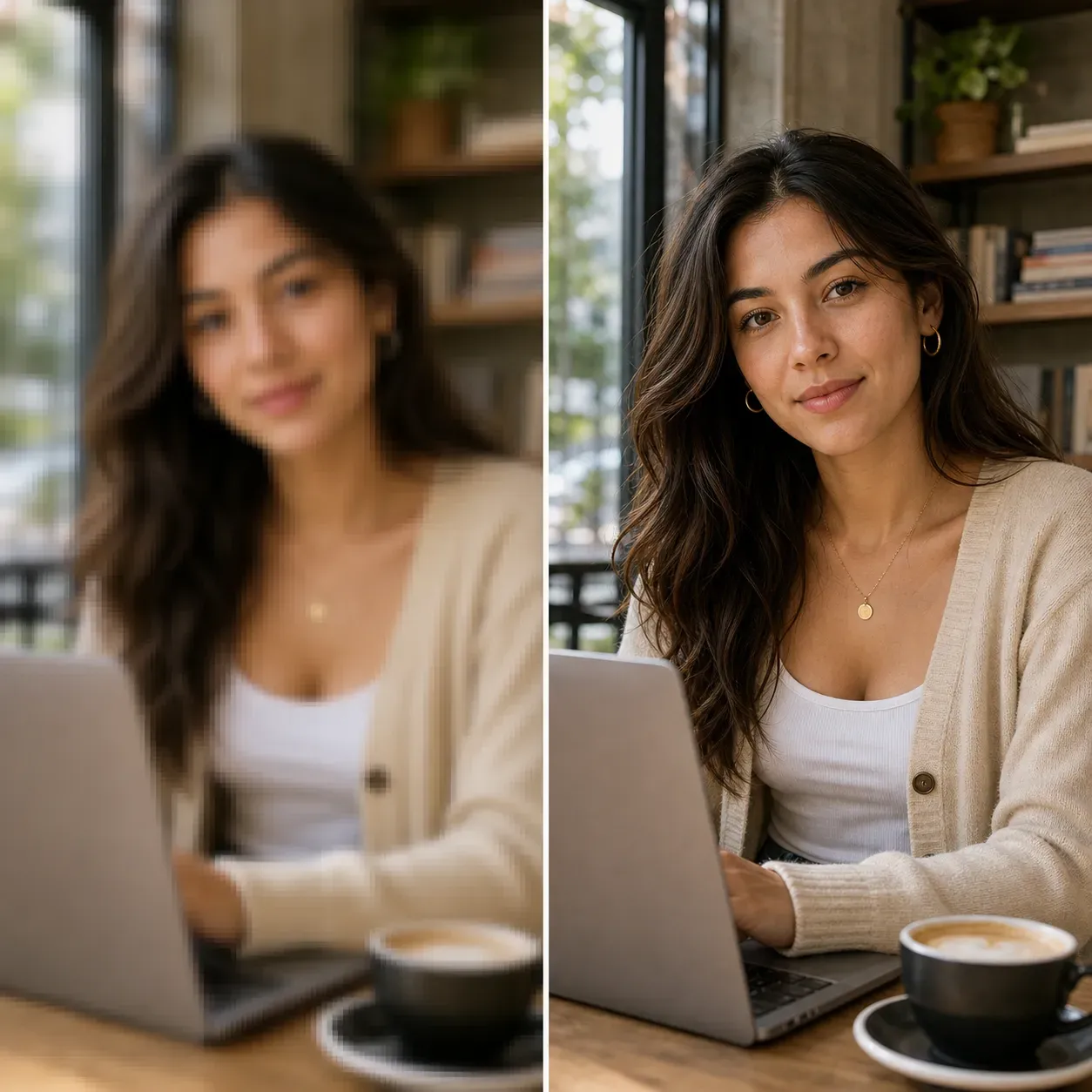
AI Image Upscaler is built for images that are too small, blurry after resizing, or not sharp enough for display. Instead of simply stretching pixels, Vidoly uses AI-based image reconstruction to enlarge the image while restoring edges, texture, and visible details. It works for portraits, product photos, AI-generated images, anime art, old photos, logos, wallpapers, posters, and social media images that need a larger output size.

How AI Image Upscaler Works

Traditional resizing tools enlarge an image by copying or interpolating existing pixels. This often makes the result look soft, blocky, or pixelated. Vidoly AI Image Upscaler analyzes image structure, edges, texture, facial details, object boundaries, and color transitions. The AI then reconstructs missing visual detail while increasing image resolution. The goal is to create a larger image that looks sharper and more usable than a standard resize. The result is still based on the original image quality. A clean low-resolution image usually upscales better than a heavily compressed, noisy, or extremely blurred image.

What Images Can You Upscale?

1. Portraits and Profile Photos Upscale selfies, headshots, profile pictures, dating photos, LinkedIn photos, and creator portraits. AI upscaling can help improve facial clarity and make small portraits more suitable for larger displays. 2. Product Photos Ecommerce sellers can upscale product images for listings, marketplace previews, ad creatives, and catalog visuals. This is useful when product photos are too small for Shopify, Amazon, Etsy, or social ads. 3. AI Art and Generated Images AI-generated images sometimes look good but export at limited resolution. Use AI Image Upscaler to enlarge AI art, fantasy portraits, concept images, wallpapers, and generated product visuals. 4. Anime and Illustration Images Upscale anime art, character images, cartoon illustrations, comic-style images, and digital drawings while preserving clean outlines and color blocks. 5. Old or Small Photos Old family photos, scanned images, and small digital photos can be enlarged for viewing, sharing, or restoration workflows. If the original image is damaged, combine upscaling with photo restoration or enhancement.

AI Image Upscaler vs AI Photo Enhancer

AI Image Upscaler focuses on increasing image size and resolution. It is the right tool when your image is too small, pixelated, or not large enough for your use case. AI Photo Enhancer focuses on improving overall photo quality, such as lighting, color, sharpness, contrast, and visible detail. It is better when the photo is already large enough but looks dull, dark, soft, or low quality. AI Image Upscaler = bigger image, higher resolution. AI Photo Enhancer = better-looking photo quality.

Best Use Cases for AI Image Upscaler

1. Ecommerce Product Listings Use AI Image Upscaler when product images are too small for marketplace requirements or look soft in zoom previews. Upscaled images can help show product shape, packaging, labels, texture, and material details more clearly. 2. Social Media and Profile Images Creators can enlarge profile photos, thumbnails, post images, and story visuals without relying on basic stretching. This is helpful when reusing older images across larger layouts. 3. Print and Poster Preparation Upscale small images before using them in posters, flyers, stickers, cards, or printed visuals. For professional printing, always check final dimensions, DPI, and visible artifacts before production. 4. AI Art Enlargement Use AI Image Upscaler to make generated images more suitable for wallpapers, covers, posters, concept boards, and design mockups. 5. Old Photo Enlargement Small old photos can be enlarged for viewing or sharing. If the photo has scratches, fading, or severe blur, use restoration or enhancement after upscaling.

What Inputs Work Best?

Use an image with a clear subject, visible edges, and not too much compression. Photos with decent lighting, sharp outlines, and low noise usually upscale better. Avoid extremely blurry images, tiny thumbnails, heavy JPEG artifacts, screenshots with small text, and images where important details are already missing. Upscaling can improve perceived clarity, but it cannot fully recover information that is not present in the original.

Common Limitations

AI Image Upscaler can enlarge and reconstruct visible details, but it cannot guarantee perfect accuracy. Tiny text, faces in the far background, complex logos, fabric patterns, license plates, or dense product labels may become distorted. For ecommerce, printing, legal documents, or brand assets, review the upscaled result carefully. If exact text, logo geometry, or product label accuracy matters, use the upscaled image as a visual improvement step, not as a final unchecked source.

How To Use AI Image Upscaler?

1

Upload your image

Choose a portrait, product photo, AI image, illustration, old photo, or small image.

2

Select an upscale level

Choose the target scale or resolution, such as 2x or 4x if available.

3

Generate the upscaled image

Vidoly enlarges the image while improving edges, texture, and visible detail.

4

Review fine details

Check faces, text, logos, product labels, patterns, and edges before final use.

5

Download the result

Save the higher-resolution image for web, ecommerce, social media, creative projects, or print preparation.

FAQs

What is AI Image Upscaler?

AI Image Upscaler is a tool that enlarges images to a higher resolution while improving visible detail and sharpness compared with basic resizing.

Is AI Image Upscaler different from AI Photo Enhancer?

Yes. AI Image Upscaler focuses on making the image larger and higher resolution. AI Photo Enhancer focuses on improving overall photo quality, such as lighting, color, and clarity.

Can I upscale an image to 2x or 4x?

Yes, AI image upscaling commonly supports scale options such as 2x or 4x depending on the tool settings. Higher scale levels may require more review for artifacts.

Can I upscale product photos?

Yes. Product photos can be upscaled for ecommerce listings, ad creatives, catalog images, and marketplace previews. Check labels, logos, and fine product details before publishing.

Can I upscale AI-generated images?

Yes. AI-generated images are a strong use case for image upscaling, especially when the original export is too small for posters, wallpapers, covers, or design mockups.

Can I upscale portraits or headshots?

Yes. Portraits, selfies, profile photos, and headshots can be upscaled. Review facial details after generation, especially around eyes, teeth, hair, and skin texture.

Can AI Image Upscaler fix blurry images?

It can improve perceived sharpness in some images, but it is not the same as a dedicated unblur tool. If the image is severely blurred, use AI Unblur or Photo Enhancer first or after upscaling.

Does image upscaling improve print quality?

It can help prepare a small image for print by increasing resolution, but it does not guarantee professional print quality. Check final size, DPI, sharpness, and artifacts before printing.

Will small text stay readable after upscaling?

Not always. Small text, dense labels, screenshots, and tiny logos may distort during AI reconstruction. Review text manually before using the result commercially.

Can I upscale old photos?

Yes. Small old photos can be enlarged. If the image has scratches, fading, stains, or damage, combine upscaling with old photo restoration or photo enhancement.

Can I use upscaled images commercially?

You can use upscaled images commercially if you own or have permission to use the original image and the output follows Vidoly’s usage terms. For product, logo, or branded images, review rights and accuracy before publishing.

What image types work best?

Clear images with visible subjects, decent lighting, and low compression work best. Extremely tiny, noisy, blurry, or heavily compressed images may still show artifacts after upscaling.