
App Store Image Translator

App Store Image Translator

Upload Image
photo_camera

Upload Image

TEMPLATE PROMPT
26/2000
Commercial usage license included
MORE IN AI Image Translator Tools

App Store Image Translator

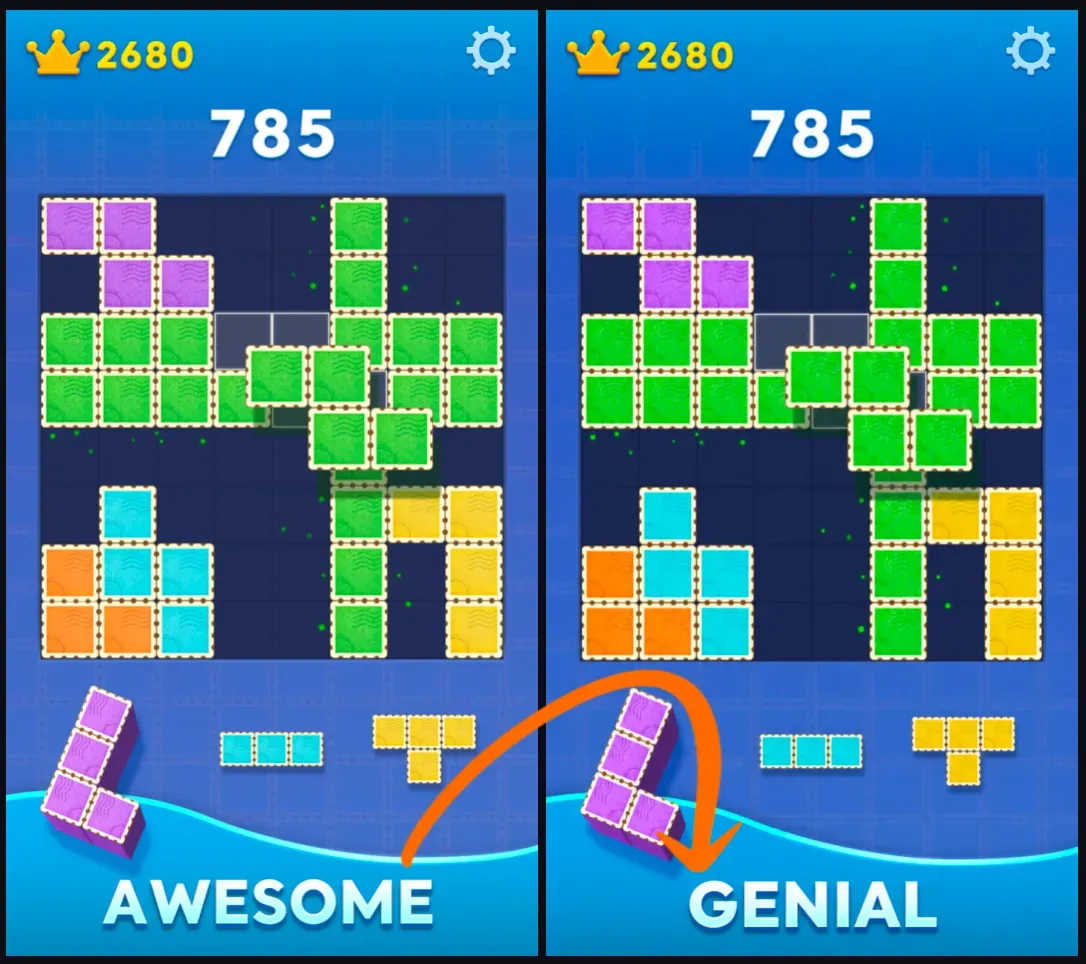
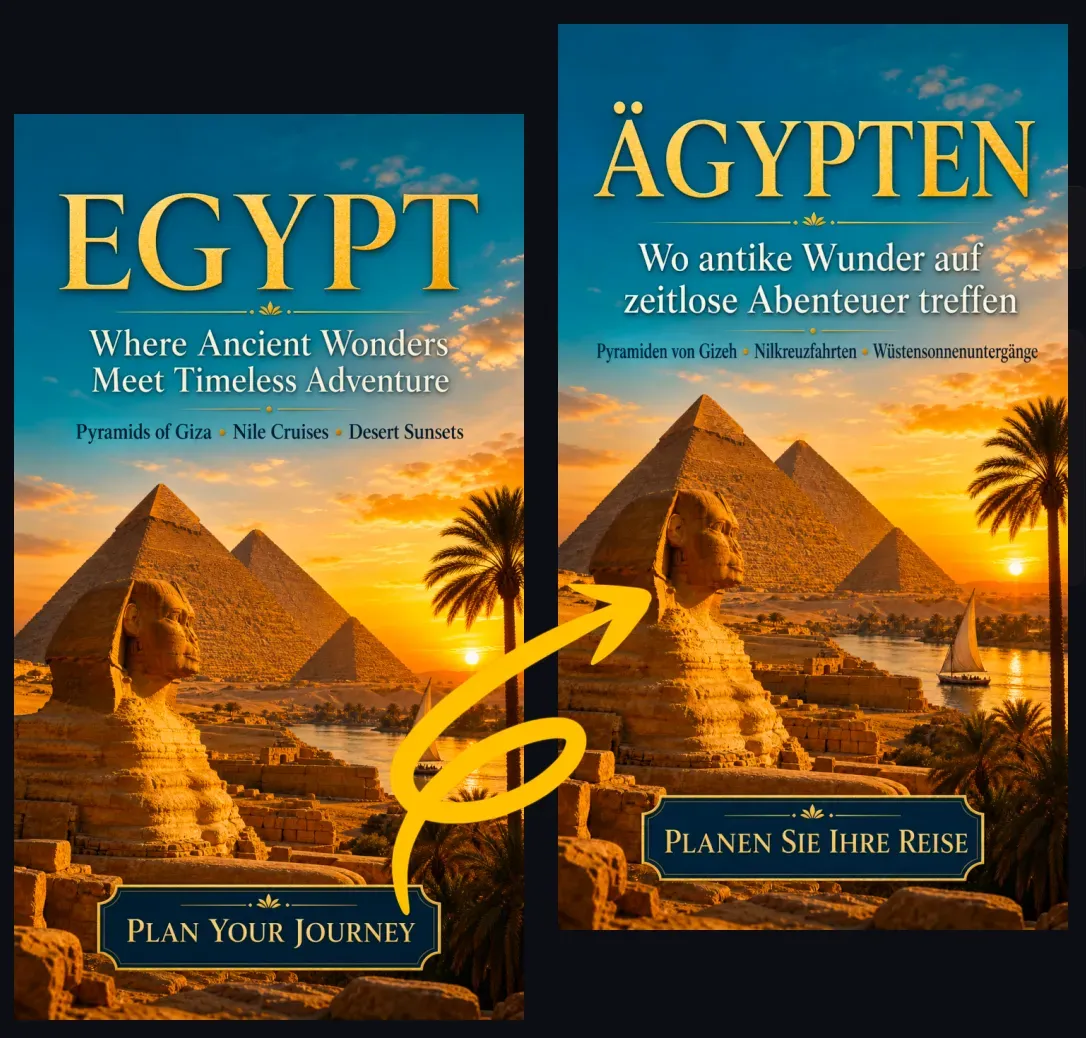
App Store Image Translator is built for app teams that need localized store images without rebuilding every screenshot manually. The AI detects visible text in your uploaded app store image, translates it into the target language, removes or reconstructs the original text area, and places the translated copy back into the same visual layout. This is useful for App Store screenshots, Google Play screenshots, feature highlight images, app promo graphics, game store images, and SaaS product previews where the output needs to remain an image, not just translated text.

How App Store Image Translator Works?

App Store Image Translator uses visual text detection, translation, image inpainting, and layout reconstruction to create a new localized image. It identifies readable text blocks, translates them into the selected language, then attempts to preserve the original background, UI screenshot, spacing, colors, typography style, and text placement. For app store assets, this matters because the translated text must fit inside fixed screenshot areas. Short English phrases may become longer in German, French, Spanish, or Indonesian, so the tool may adjust line breaks, font size, or spacing to keep the translated copy readable inside the original design.

What App Store Images Can You Translate?

You can use App Store Image Translator for: App Store screenshots Google Play screenshots App preview feature images Mobile app onboarding screenshots Game store screenshots SaaS mobile product images Subscription feature graphics Before-and-after app screenshots App update promotional images Localized store listing visuals The tool works best when the source image contains clear marketing text, feature labels, UI captions, or short product benefit copy.

Translate App Store Images Without Rebuilding the Design

Traditional app screenshot localization often requires designers to open the source file, replace every text layer, check line breaks, export each language version, and repeat the process for multiple screen sizes. App Store Image Translator reduces that manual work by generating a translated image directly from the uploaded screenshot. This is especially useful when you do not have the original Figma, PSD, Sketch, or Canva file, or when you need quick localized variants for testing different app store markets.

App Store Image Translator vs Manual Localization

App Store Image Translator is best for quick localization drafts, ASO testing, early market validation, and translating existing store graphics when source files are unavailable. Manual design tools are still better for final production assets that require exact brand typography, pixel-perfect alignment, legal copy review, or App Store compliance checks. A practical workflow is to use AI for the first translated image version, then review the text, spacing, claims, screenshots, and platform requirements before publishing.

Best Images for Accurate App Store Translation

Use images with clear, readable text and enough spacing around each text block. Simple screenshot layouts, high contrast typography, and short headline-style copy usually translate better than dense paragraphs or small UI labels. Best input conditions: High-resolution app store screenshots Clear headline or feature text Minimal motion blur or compression Readable text with good contrast Enough empty space around text Simple backgrounds behind text Short benefit statements instead of long paragraphs Avoid uploading heavily compressed screenshots, tiny text, busy backgrounds, overlapping UI elements, or images where important words are partially hidden.

Popular Use Cases

App Developers App developers can translate store screenshots for new markets without redesigning every asset from scratch. This helps teams prepare localized visuals for launches, updates, and market tests. ASO Teams ASO teams can generate translated app store images for different countries and compare how localized benefit copy looks before creating final production assets. Mobile Game Publishers Game publishers can translate store images, feature banners, and gameplay highlight screenshots for international users while keeping the original visual style. SaaS and Subscription Apps Product teams can localize mobile app screenshots that explain dashboards, premium features, onboarding flows, or subscription benefits. Agencies and Localization Teams Agencies can produce quick visual drafts for clients before sending final screenshots to designers, translators, or regional reviewers.

Common Limitations

App Store Image Translator may struggle with very small UI text, dense screenshots, unusual fonts, overlapping text, curved text, logos, or heavily stylized game typography. Translated text may also become longer than the original phrase, which can affect line breaks or spacing. For commercial publishing, review the final image before uploading it to App Store Connect or Google Play Console. Check translation accuracy, platform policy requirements, product claims, legal disclaimers, brand names, screenshots, and any text that appears inside the app UI.

How To Use App Store Image Translator?

1

1. Upload an App Store, Google Play, or app promo image.

2

2. Choose the target language for localization.

3

3. Let AI detect and translate the visible text in the image.

4

4. Review the translated image for text fit, meaning, and layout.

5

5. Download the localized image and use it as a draft or publishing asset.

FAQs

What is an App Store Image Translator?

An App Store Image Translator is an AI tool that translates visible text inside app store screenshots and promotional store images, then generates a new image with the translated text placed back into the original layout.

Can I translate Google Play screenshots too?

Yes. The same workflow can be used for Google Play screenshots, app feature graphics, Android app listing images, and mobile game store images.

Is this different from a normal image translator?

Yes. A normal image translator may only extract and translate text. App Store Image Translator focuses on producing a new localized image that keeps the screenshot design, UI preview, and marketing layout.

Can it keep the original app screenshot design?

The tool is designed to preserve the original composition, colors, UI screenshot, and text placement as much as possible. Complex layouts or very long translations may still need manual review.

What languages can I translate app store images into?

You can position the tool for common localization languages such as Spanish, French, German, Japanese, Korean, Chinese, Portuguese, Italian, Arabic, Indonesian, Vietnamese, and Thai.

Will the translated text fit the same space?

The AI can adjust line breaks, spacing, or font size to help translated text fit the original area. Some languages expand significantly, so final review is recommended.

Can I use the output directly in App Store Connect?

You can use the output as a draft or publishing asset, but review it first for translation accuracy, text readability, platform rules, legal claims, and brand requirements.

Does it translate text inside the app UI?

It can translate visible text in the uploaded image if the text is readable. Very small UI labels, low-resolution text, or compressed screenshots may be harder to process accurately.

Should brand names or app names be translated?

Usually no. App names, brand names, product names, URLs, legal marks, and trademarks should normally stay unchanged unless your localization strategy requires a translated version.

Who should use App Store Image Translator?

It is useful for app developers, ASO marketers, mobile game publishers, SaaS teams, localization agencies, and ecommerce app teams preparing app store visuals for multiple markets.