
Best AI Image Translator for App Store Screenshots & Global Localization (2026)
 By Vivi/1 min read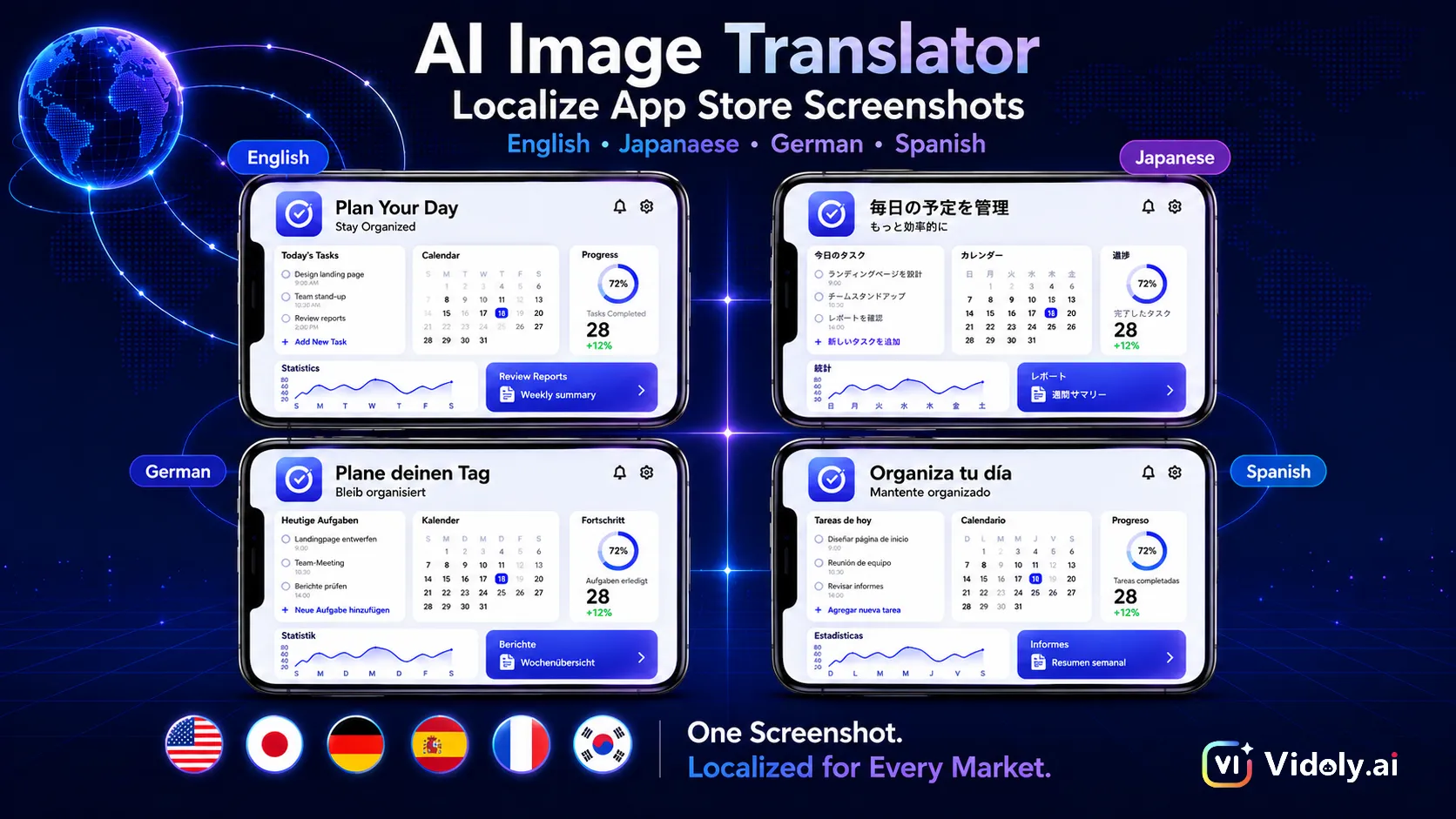
Discover how an AI Image Translator helps developers and marketers translate App Store and Google Play screenshots while preserving layouts, typography, and branding. Learn the best practices for image localization in 2026.
Best AI Image Translator in 2026: Localize App Store Screenshots Without Rebuilding Your Design
Imagine you've just finished preparing your app for launch.
After weeks of product design, UI polishing, and ASO optimization, your App Store listing is finally ready. Your screenshots are pixel-perfect, your marketing copy is compelling, and your English listing is ready to go live.
Then your growth team delivers the next request:
"We're launching in Japan, Germany, France, and Spain next month. Can we localize all the App Store screenshots?"
What sounds like a simple translation task quickly becomes one of the most time-consuming parts of your launch.
Instead of translating a few lines of text, you suddenly need to recreate dozens of marketing assets. Designers reopen Figma or Photoshop files, translators deliver localized copy, text boxes need resizing, layouts break because German sentences are longer than English ones, and every language requires another round of QA before the screenshots can finally be uploaded.
Now imagine repeating the same workflow every time your app introduces a new feature or updates its interface.
This is exactly why more global teams are adopting an AI-powered professional app screenshot translator for global markets.
Rather than rebuilding every screenshot manually, modern AI can detect text, translate it into another language, intelligently reconstruct the background, and replace the original copy while preserving the overall design. What once took days can now be completed in minutes.
Although AI image translation is widely used for marketing posters, ecommerce product images, presentations, and social media creatives, one of its highest-value applications today is App Store and Google Play screenshot localization. For mobile developers, game studios, SaaS companies, and ASO teams, it removes one of the biggest bottlenecks in global expansion.
In this guide, you'll learn what an AI Image Translator is, why App Store screenshots require specialized localization, how AI transforms traditional localization workflows, and how to create multilingual store assets without sacrificing design quality.
An AI Image Translator can localize the same App Store screenshot into multiple languages while preserving identical layouts, typography, colors, and branding—making global app launches faster and more consistent.
Quick Answer
An AI Image Translator for seamless multilingual visual localization is an AI-powered tool that detects text inside an image, translates it into another language, and seamlessly replaces the original text while preserving the image's layout, background, and visual style.
Unlike traditional OCR software, which only extracts text, modern AI image translators perform text recognition, background reconstruction (AI inpainting), translation, and typography matching in a single workflow.
For developers and marketers, this makes it possible to localize App Store and Google Play screenshots without rebuilding every design from scratch.
What You'll Learn
By the end of this guide, you'll understand:
• What an AI Image Translator actually does
• Why image localization is becoming essential for global marketing
• Why App Store screenshots are one of the most challenging image types to translate
• How AI simplifies App Store localization workflows
• Best practices for preserving layouts and branding across languages
• How Vidoly helps teams automate the workflow for multilingual screenshot localization more efficiently
What Is an AI Image Translator?
An AI Image Translator is much more than a translation tool.
Instead of simply reading text from an image, it understands how text and visual design work together before generating a localized version that looks natural.
A modern AI image translation workflow typically includes four steps:
Text Detection → Background Reconstruction → AI Translation → Typography Matching
Each stage solves a different challenge.
First, Optical Character Recognition (OCR) identifies every editable text region inside the image.
Next, AI uses background reconstruction (also known as AI inpainting) to remove the original text while restoring the surrounding pixels naturally, preventing blurry patches or visible editing marks.
The translated content is then generated using contextual machine translation instead of simple word replacement.
Finally, AI attempts typography matching, preserving font size, alignment, spacing, colors, shadows, and overall visual hierarchy so the translated image remains consistent with the original design.
The final output isn't just translated text—it's a publish-ready image.
This workflow has become increasingly valuable for businesses that create multilingual visual assets, including:
• App Store and Google Play screenshots
• Automated Amazon listing product image generation
• Scalable Shopify product image generation for global stores
• Multilingual advertising campaign production in AI Ad Studio
• High-conversion marketing visuals with an AI poster generator
As companies expand globally, image localization is no longer a niche requirement—it's becoming a standard part of international marketing.
Why Image Localization Matters More Than Ever
When businesses enter new markets, translating an app or website is only part of the localization process.
Visual assets matter just as much.
Imagine visiting an App Store listing in Japanese, only to find every screenshot still written in English. Even if the app supports Japanese after installation, the experience immediately feels incomplete.
This is why image localization has become an important component of App Store Optimization (ASO) and global marketing.
Instead of redesigning every asset for every region, companies increasingly reuse existing creative assets while adapting the messaging for local audiences.
Today, AI image translation is commonly used for:
• App Store screenshots
• Google Play listing assets
• Mobile game screenshots
• SaaS onboarding graphics
• Website interface screenshots
• Marketing banners
• Product feature illustrations
• Social media advertisements
• Infographics and presentations
When entirely new visuals are needed, teams often combine translated assets with an AI image generator for creative design or use an AI image expander for flexible aspect ratio adaptation to adapt designs for different screen sizes and campaign formats.
Among all these scenarios, App Store screenshot localization delivers some of the highest business impact, because screenshots directly influence conversion rates, user trust, and download decisions.
For many developers, improving multilingual screenshots is one of the fastest ways to strengthen ASO while scaling into new international markets.
Why App Store Screenshots Require Specialized AI
At first glance, translating an App Store screenshot seems no different from translating a poster or a social media graphic.
In reality, it's one of the most demanding image localization tasks.
Unlike ordinary images, App Store and Google Play screenshots are high-conversion marketing assets. Every headline, color, spacing, and visual element is carefully designed to communicate value within just a few seconds. Even small changes can affect readability, branding, and ultimately conversion rates.
This is why generic translation tools often produce disappointing results.
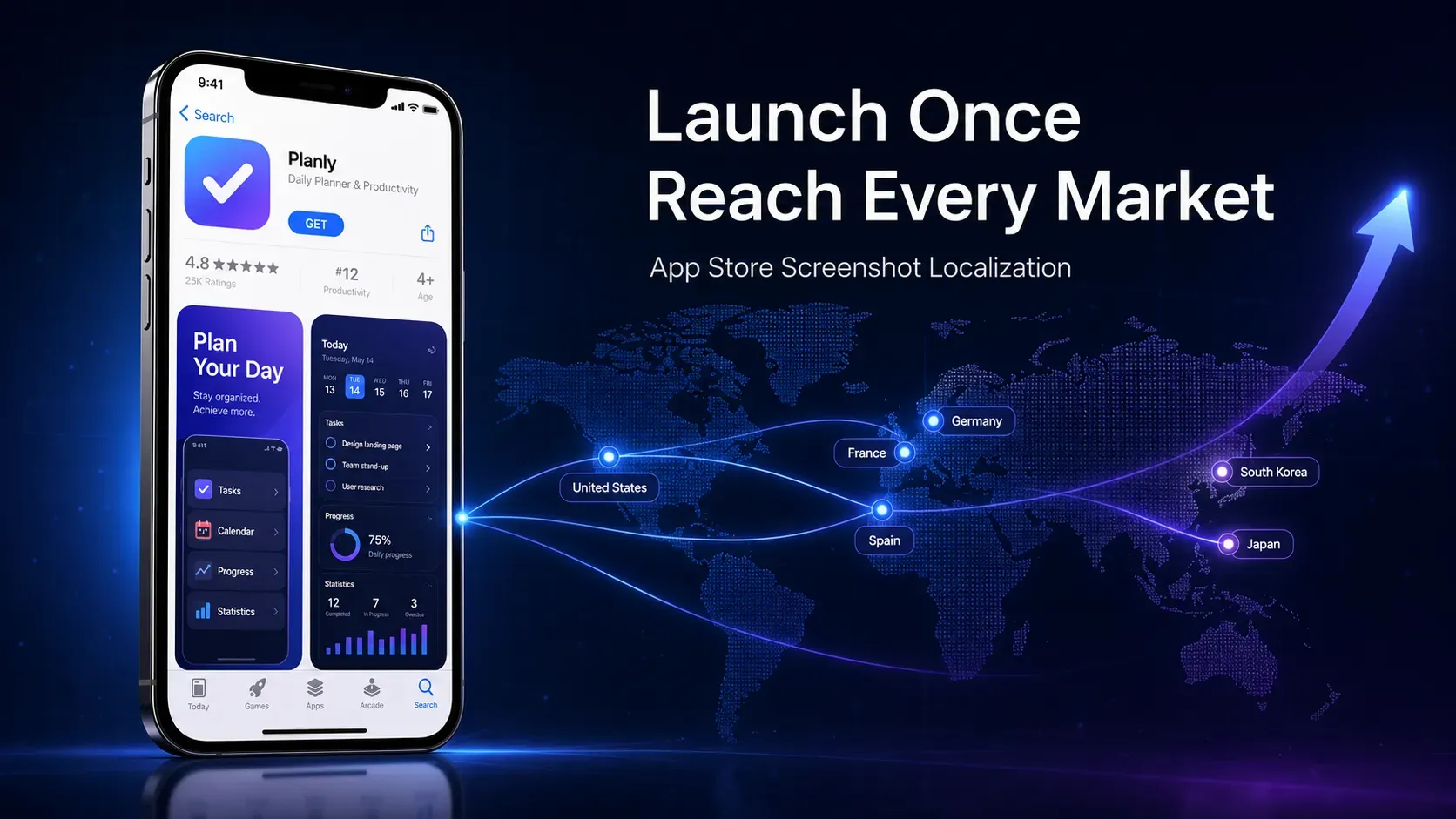
Localizing App Store screenshots helps developers deliver native experiences to users across multiple countries without redesigning every visual asset.
Challenge 1: Text Expansion Breaks the Design
One of the biggest localization challenges is that different languages occupy different amounts of space.
For example:
• German translations are often 20–35% longer than English.
• French frequently requires additional words to express the same idea.
• Japanese and Korean use fewer characters but follow completely different spacing rules.
• Arabic introduces right-to-left (RTL) layouts.
A headline like:
Manage Your Money Smarter
might fit perfectly in English but suddenly wrap onto two lines after translation, pushing other design elements out of alignment.
Traditional editing requires designers to manually resize text boxes, reposition graphics, and rebalance the entire composition.
A modern AI image translator for global app localization, however, can intelligently adapt text placement while maintaining the original visual hierarchy, significantly reducing manual adjustments.
Challenge 2: Typography Is Part of Your Brand
Successful App Store screenshots don't rely on text alone.
They use typography to reinforce branding.
Many screenshots include:
• Custom fonts
• Gradient text
• Drop shadows
• Outline effects
• Bold feature headlines
• Layered UI elements
Replacing the copy with a standard system font immediately makes the localized version look less polished.
Advanced AI image translation focuses not only on language replacement, but also on Typography Matching—recreating font weight, alignment, spacing, colors, and visual style so the translated image feels consistent with the original design.
Challenge 3: Background Reconstruction
One of the easiest ways to identify poor image translation is by looking at the area where the original text was removed.
Basic editing tools often leave:
• Blurry patches
• Smudged gradients
• Broken UI components
• Visible editing marks
Modern AI solves this through Background Reconstruction (also called AI Inpainting).
Instead of simply deleting text, AI analyzes the surrounding pixels and reconstructs the hidden background naturally, allowing translated text to blend into the design as if it had always been there.
This is particularly important for screenshots featuring complex interfaces, colorful dashboards, or mobile game scenes.
Challenge 4: Manual Localization Doesn't Scale
Imagine your app includes:
• 8 App Store screenshots
• 10 target languages
• Quarterly feature updates
That quickly becomes 80 localized screenshots—before the next product release.
The traditional workflow usually looks like this:
Export Design Files → Send Copy to Translators → Replace Text Manually → Adjust Layouts → QA Every Language → Export Again
Even for experienced teams, this process consumes hours of repetitive work.
With an AI-powered workflow, the process becomes much simpler:
Upload Screenshot → Select Target Language → AI Translates & Rebuilds the Design → Review → Export
Instead of treating localization as a design project, AI transforms it into a scalable content production workflow.
Traditional Workflow vs AI Image Translation
The difference between traditional localization and AI-powered localization isn't just speed—it's efficiency across the entire production pipeline.
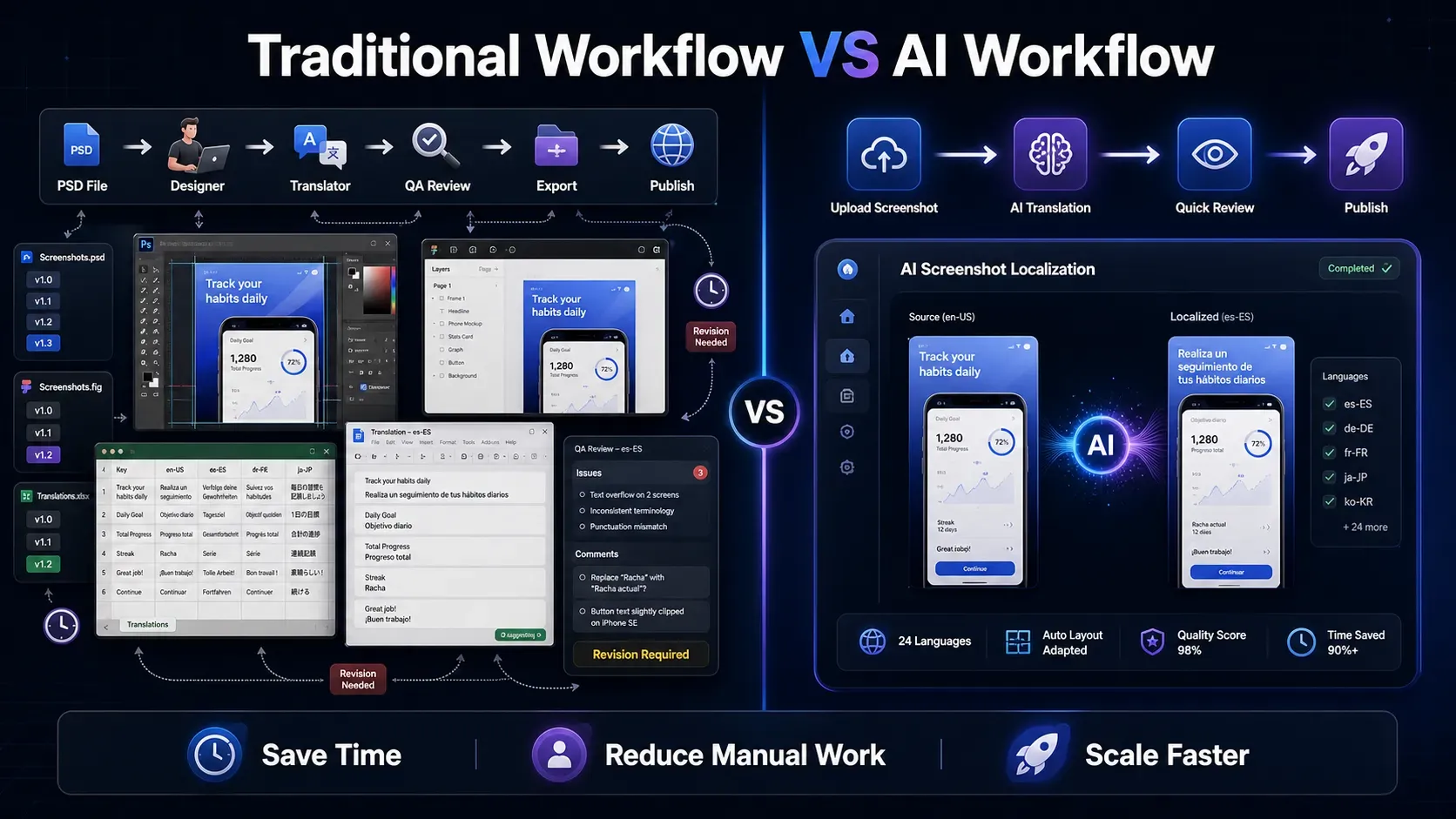
AI Image Translator simplifies screenshot localization by replacing multiple manual editing steps with an automated workflow.
| Traditional Workflow | AI Image Translator |
|---|---|
| Export PSD or Figma files | Upload a finished screenshot |
| Extract text manually | Detect text automatically |
| Translate copy separately | Translate within the same workflow |
| Replace every text layer | Replace text while preserving layouts |
| Rebuild typography manually | Match fonts and visual styling intelligently |
| Repeat for every language | Generate multiple localized versions quickly |
For example, localizing five App Store screenshots into six languages means creating 30 different assets.
With a traditional workflow, designers may spend several hours—or even days—updating layouts and exporting files.
With AI, the same project can often be completed in a fraction of the time, allowing marketing and ASO teams to focus on optimization rather than repetitive production work.
Why More ASO Teams Are Choosing AI Image Translators
App Store Optimization is no longer just about keywords and app descriptions.
Visual assets have become one of the strongest factors influencing download decisions.
As a result, localization is no longer viewed as a one-time design task—it's an ongoing growth strategy.
More ASO teams are adopting our AI-powered image translation tool because they help:
• Launch multilingual App Store listings faster.
• Maintain consistent branding across every market.
• Reduce dependency on repetitive design revisions.
• Lower localization costs without sacrificing quality.
• Scale visual assets for frequent product updates.
How to Translate App Store Screenshots with an AI Image Translator
Now let's see how an AI Image Translator fits into a real localization workflow.
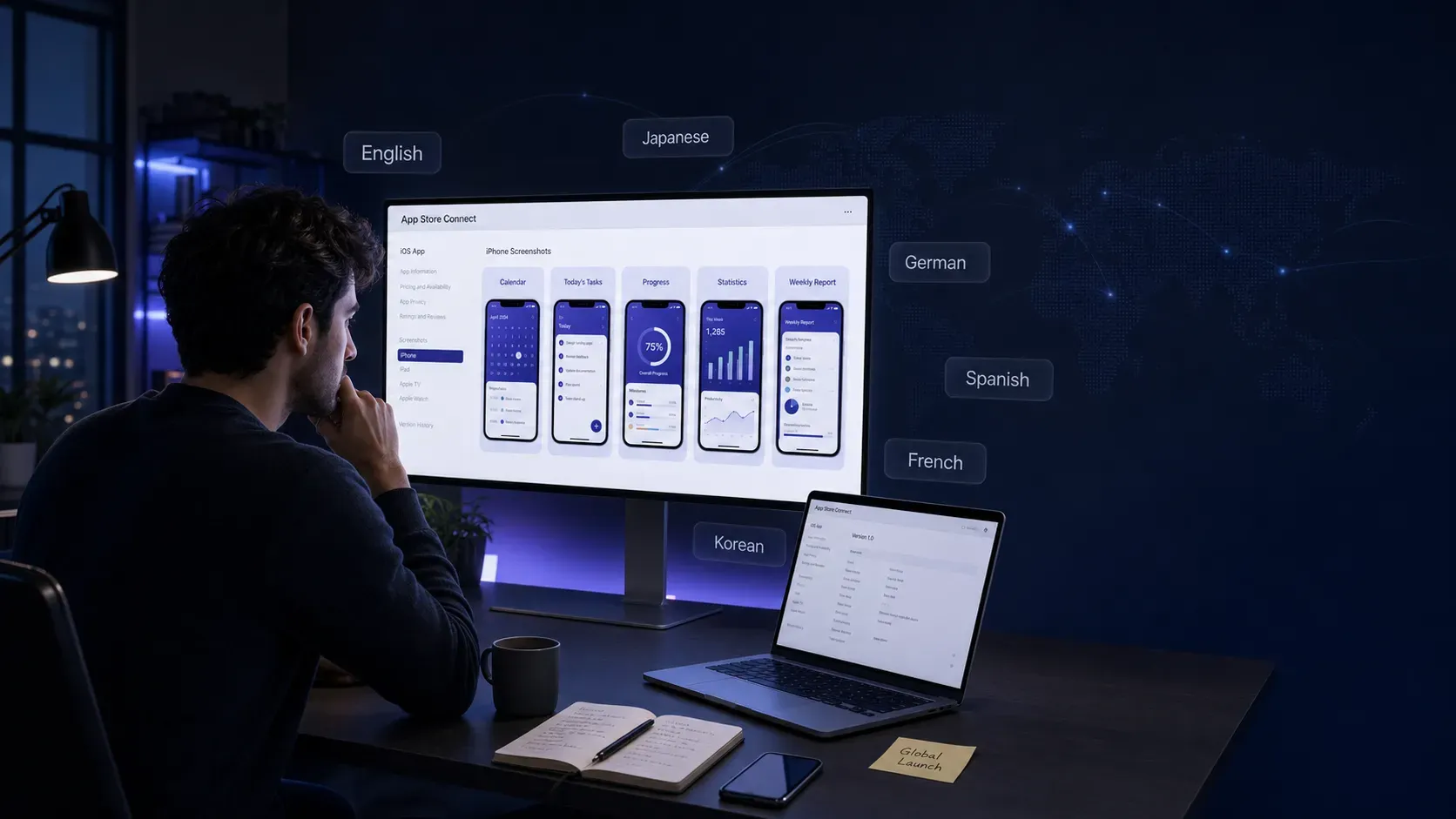
Imagine you've completed the English App Store listing for your productivity app. The screenshots have already been optimized for ASO, and your marketing team wants to launch in Germany, Japan, and Spain before the next product release.
Instead of reopening your design files and recreating every screenshot, the entire process can be simplified into four steps.
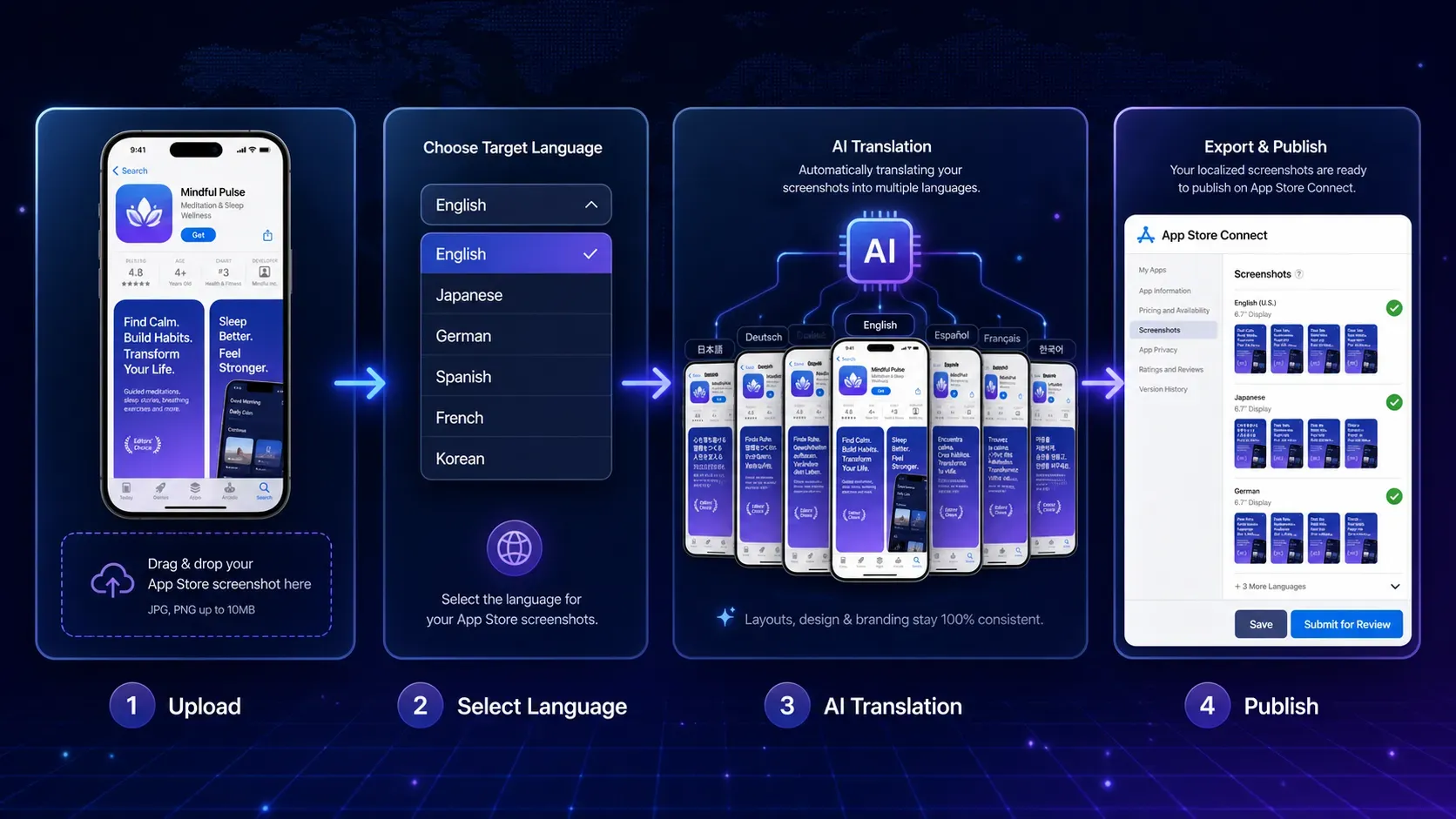
Translate App Store screenshots in four simple steps using AI Image Translator.
Step 1: Upload Your Original Screenshot
Open Vidoly and upload your original App Store or Google Play screenshot to our AI-powered image translation tool for app screenshots.
Unlike traditional design workflows, you don't need the original PSD or Figma file. A high-resolution PNG or WebP export is usually enough for AI to begin analyzing the image.
The AI automatically identifies editable text while recognizing the surrounding visual structure, including:
• Device mockups
• Interface elements
• Icons
• Background graphics
• Decorative effects
This creates the foundation for accurate image localization without damaging the original design.
Step 2: Select Your Target Language
Choose the language you want to generate.
Whether you're localizing for German, Japanese, Korean, French, Spanish, Portuguese, or another market, the AI generates a translated version based on the existing screenshot.
For multilingual launches, this workflow can be repeated quickly across multiple languages without rebuilding layouts from scratch.
Step 3: Let AI Translate and Reconstruct the Image
This is where modern AI differs from traditional OCR software.
Instead of simply extracting text, the AI performs several tasks simultaneously:
• Detects all editable text regions
• Removes the original language
• Reconstructs the hidden background
• Generates translated copy
• Inserts new text while matching the original layout and typography
The result is a localized screenshot that maintains the visual identity of the original design.
For App Store assets, AI aims to preserve:
• Device frames
• UI layouts
• Icons
• Background illustrations
• Brand colors
• Text alignment
• Overall visual hierarchy
Rather than creating an entirely new design, AI adapts the existing creative for another language.
Step 4: Review Before Publishing
Although AI dramatically reduces manual work, reviewing localized assets is still an important step.
Before uploading your screenshots to the App Store or Google Play, check that:
• Product terminology remains consistent.
• Marketing headlines sound natural.
• CTA buttons fit comfortably within the design.
• Text doesn't overlap UI elements.
• Brand messaging matches your target market.
After a quick review, your localized screenshots are ready for publishing.
Compared with the traditional localization process, this workflow is significantly faster while requiring far fewer design revisions.
What Should Stay the Same During Translation?
Successful localization isn't about changing everything.
It's about changing only the language while preserving the visual identity users already recognize.
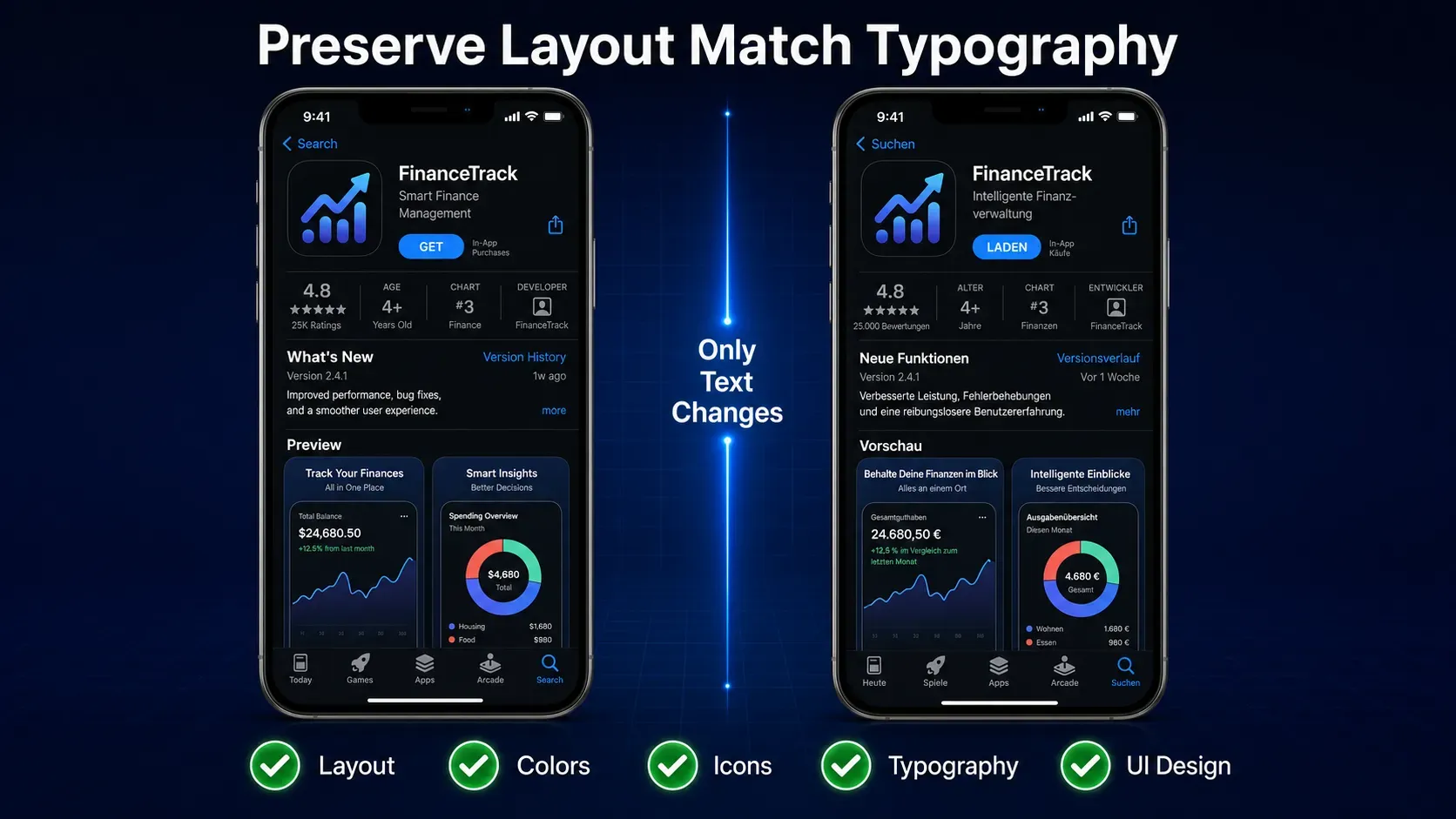
A high-quality AI Image Translator should preserve every visual element except the translated text.
When evaluating an AI Image Translator, these are the elements that should remain consistent:
✅ Device Mockups — Phone frames, bezels, and screen positioning should remain untouched.
✅ Background Graphics — Gradients, textures, and illustrations should appear seamless after text replacement.
✅ Typography Style — Font weight, spacing, shadows, outlines, and color treatments should closely match the original design.
✅ UI Components — Buttons, icons, charts, menus, and interface elements should remain exactly where they are.
✅ Brand Identity — Every localized screenshot should still feel like it belongs to the same product, regardless of language.
The objective is simple:
Change the message—not the design.
Beyond App Store Screenshots: Other High-Value Use Cases
Although App Store localization is one of the most valuable applications, AI image translation supports many other global marketing scenarios.
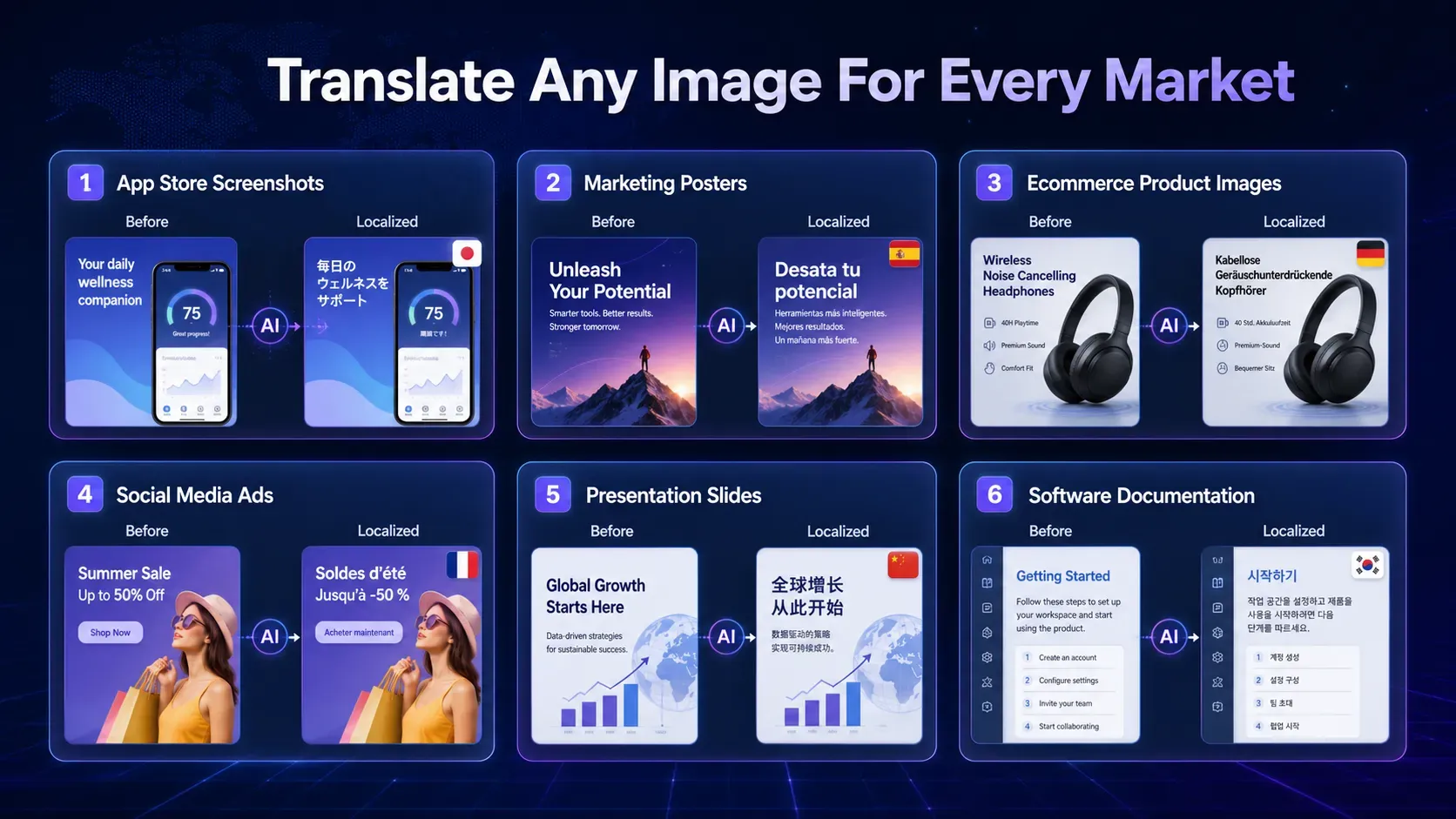
AI Image Translator supports multilingual localization across marketing, ecommerce, software, and content creation workflows.
Ecommerce Product Images
Cross-border ecommerce sellers often need localized product images for different marketplaces.
Instead of creating separate visuals for every country, teams can translate existing product graphics while maintaining consistent branding.
This workflow pairs naturally with an Amazon Listing Product Image Generator(Amazon Listing Product Image Generator) or a Shopify Product Image Generator(Shopify Product Image Generator), allowing businesses to scale international product listings more efficiently.
Marketing Posters and Promotional Campaigns
Seasonal campaigns often need to be localized across multiple countries.
Rather than redesigning every banner, marketers can translate promotional visuals while preserving the original creative style.
When new campaign assets are required, an AI Poster Generator(Poster Generator) can help generate multilingual marketing materials that match regional events and promotions.
Social Media Advertising
Global advertising campaigns rarely use a single language.
Marketing teams frequently create multiple versions of the same creative for different audiences.
Combining localized visuals with AI Ad Studio(Ad Studio) makes it easier to produce multilingual ad creatives while maintaining consistent messaging across platforms such as Facebook, Instagram, TikTok, and Google Ads.
Software Documentation and Tutorials
Many SaaS companies localize:
• Product walkthroughs
• Feature guides
• Dashboard screenshots
• Help center illustrations
• Training materials
Instead of rebuilding documentation for every language, AI enables faster localization while preserving the structure users already understand.
Website Screenshots and Presentations
Sales teams, consultants, and product marketers often translate website screenshots, presentation slides, and feature overviews when entering new international markets.
If additional visuals need to be created alongside translated content, an AI Image Generator(AI Image Generator) and AI Image Expander(AI Image Expander) can further streamline multilingual creative production.
AI Image Translator vs Traditional OCR
People often use the terms OCR and AI Image Translator interchangeably, but they solve very different problems. While OCR just detects text, an AI-powered App Store screenshot translator provides a complete, publish-ready visual solution.
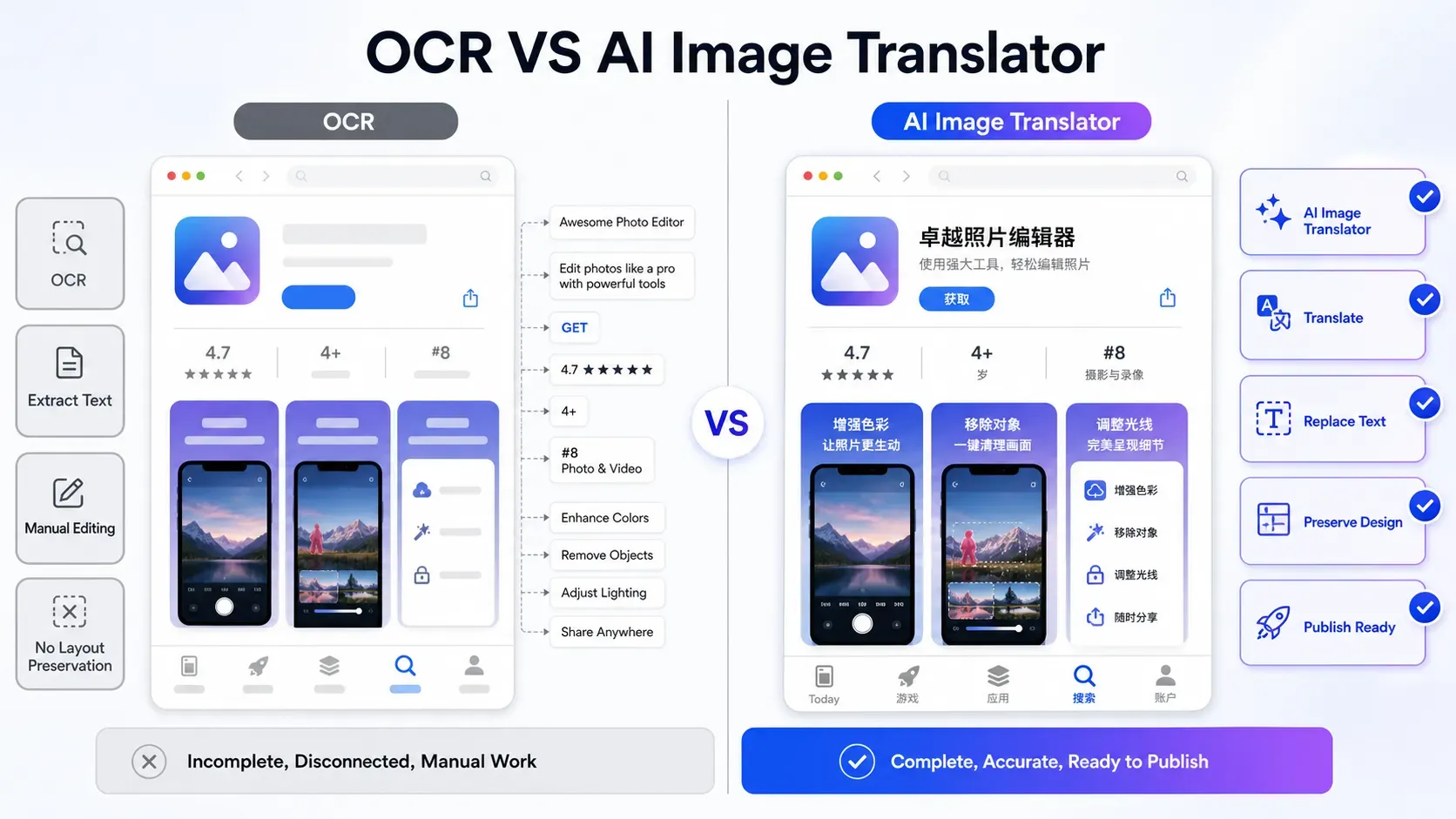
Unlike OCR, AI Image Translator rebuilds localized images while preserving layouts and design quality.
OCR (Optical Character Recognition) is designed to extract text from an image. It's ideal for digitizing scanned documents, invoices, or printed files, but it stops there. Once the text is extracted, you still need to translate it, remove the original text from the image, rebuild the background, and manually place the translated copy back into the design.
An AI Image Translator, on the other hand, completes the entire localization workflow.
| Feature | Traditional OCR | AI Image Translator |
|---|---|---|
| Detect text | ✅ | ✅ |
| Translate text | Requires additional tools | ✅ |
| Remove original text | ❌ | ✅ |
| Background reconstruction | ❌ | ✅ |
| Typography matching | ❌ | ✅ |
| Preserve layouts | ❌ | ✅ |
| Export a publish-ready image | ❌ | ✅ |
If your goal is simply to copy text from an image into a document, OCR is enough.
If your goal is to publish a localized App Store screenshot, ecommerce graphic, or marketing banner, an AI Image Translator is the more complete solution.
Best Practices for Image Localization
Whether you're localizing App Store screenshots or marketing materials, following a few best practices will help you achieve more natural, professional-looking results.
Use High-Resolution Images
Always upload high-quality PNG or WebP files whenever possible.
Sharper images improve text detection accuracy and make Background Reconstruction significantly cleaner.
Leave Enough Space for Longer Languages
Some languages naturally expand after translation.
When designing your original screenshots, avoid placing text too close to icons, buttons, or screen edges. Giving headlines extra breathing room reduces the need for later adjustments.
Localize Your Marketing Message—Not Just the Words
Literal translation doesn't always produce the highest-converting copy.
For App Store screenshots, your headlines should communicate the same value proposition while sounding natural to local users.
For example, a marketing CTA should feel persuasive in every language—not simply translated word-for-word.
Keep Brand Elements Consistent
Localization should never weaken your visual identity.
Review whether your:
• Colors
• Typography
• Icons
• Product terminology
• Brand tone
remain consistent across every language version.
Always Review Before Publishing
AI dramatically accelerates localization, but human review is still recommended.
Before uploading screenshots to the App Store or Google Play, verify:
• Text fits naturally within the layout.
• Feature names are translated correctly.
• Product terminology is consistent.
• Buttons and UI elements remain unobstructed.
A quick quality check helps ensure the localized version delivers the same user experience as the original.
Common Mistakes to Avoid
Even with AI, a few common mistakes can reduce the quality of localized assets.
❌ Using Low-Resolution Screenshots
Blurry images make text detection less accurate and may produce lower-quality reconstruction results.
❌ Translating Brand Names
Your app name, product name, or registered trademarks should usually remain unchanged unless you have an official localized brand strategy.
❌ Ignoring Text Expansion
German, French, Spanish, and several other languages often require more space than English.
Always review layouts for expanded text before publishing.
❌ Forgetting ASO Consistency
Your screenshot messaging should align with your localized:
• App title
• Subtitle
• Description
• Keywords
Maintaining consistent messaging strengthens your overall App Store Optimization strategy.
Frequently Asked Questions
How can I translate App Store screenshots into multiple languages?
Use an AI image translation tool for app store screenshots.
Can AI localize Google Play screenshots as well as App Store screenshots?
Yes. AI Image Translators work with both App Store and Google Play screenshots. They replace only the text while keeping your UI, colors, and branding consistent across every language.
What is the best AI Image Translator for App Store localization?
Look for an AI Image Translator that supports text replacement, background reconstruction, typography matching, and layout preservation. Vidoly AI Image Translator(AI Image Translator) combines these features to help developers create publish-ready localized screenshots faster.
Can AI preserve the original layout and fonts during translation?
Yes. A high-quality AI Image Translator keeps your layout, colors, icons, and typography consistent while replacing only the translated text. The result looks like it was originally designed in the target language.
Can I translate App Store screenshots without Photoshop or Figma?
Absolutely. Simply upload your screenshot, choose a target language, and let AI generate a localized version. No original design files or manual editing are required.
What's the difference between OCR and an AI Image Translator?
OCR only extracts text from an image. An AI Image Translator goes further by translating the text, rebuilding the background, and generating a fully localized image that's ready to publish.
Which languages can an AI Image Translator support?
Most AI Image Translators support dozens of languages, including English, Japanese, German, Spanish, French, Korean, Chinese, and Portuguese, making global app localization much easier.
Can I use an AI Image Translator for ecommerce product images?
Yes. Besides App Store screenshots, AI Image Translators can localize Amazon listings, Shopify product images, marketing banners, and promotional graphics. You can also explore Amazon Listing Product Image Generator(Amazon Listing Product Image Generator) and Shopify Product Image Generator(Shopify Product Image Generator) for ecommerce workflows.
Can AI Image Translator translate marketing posters and social media graphics?
Yes. AI Image Translators work with posters, presentations, social media creatives, advertisements, and other visual assets, helping you localize marketing content without redesigning it.
Does translating App Store screenshots improve ASO?
Yes. Localized screenshots help international users understand your app more quickly, which can improve engagement and conversion rates. As part of a strong ASO strategy, they make your App Store listing more effective across global markets.
Conclusion
Global growth no longer depends solely on translating your app—it also depends on translating the visuals that convince users to download it.
An AI Image Translator makes this process dramatically more efficient by combining text detection, translation, background reconstruction, and typography matching into a single workflow. Instead of rebuilding every screenshot for every language, teams can localize existing assets while preserving the design quality they've already invested in.
Although this guide focused on App Store and Google Play screenshot localization, the same technology can also accelerate multilingual marketing across ecommerce, advertising, social media, documentation, and product education.
Whether you're an independent developer preparing your first international launch or a global marketing team managing dozens of localized campaigns, AI image translation helps you reduce production time, maintain brand consistency, and scale visual content more efficiently.
If you're ready to simplify image localization, Vidoly AI Image Translator offers two flexible workflows to match different needs. Use the General AI Image Translator for translating everyday images such as posters, product graphics, and presentations, or choose the App Store Image Translator when you need to localize App Store and Google Play screenshots while preserving layouts, typography, and branding.
Instead of rebuilding every design for every market, upload your image, select your target language, and let AI handle the localization—so your team can focus on creating great products and reaching users around the world.
Related Articles
Free Photo to Sketch AI Generator: Convert Any Photo to a Pencil Sketch Online
AI Art Generator: Turn Photos into Oil Paintings with AI (Free Online Tool)