
How to Translate Product Images on Shopify for Different Languages
 By Vivi/1 min read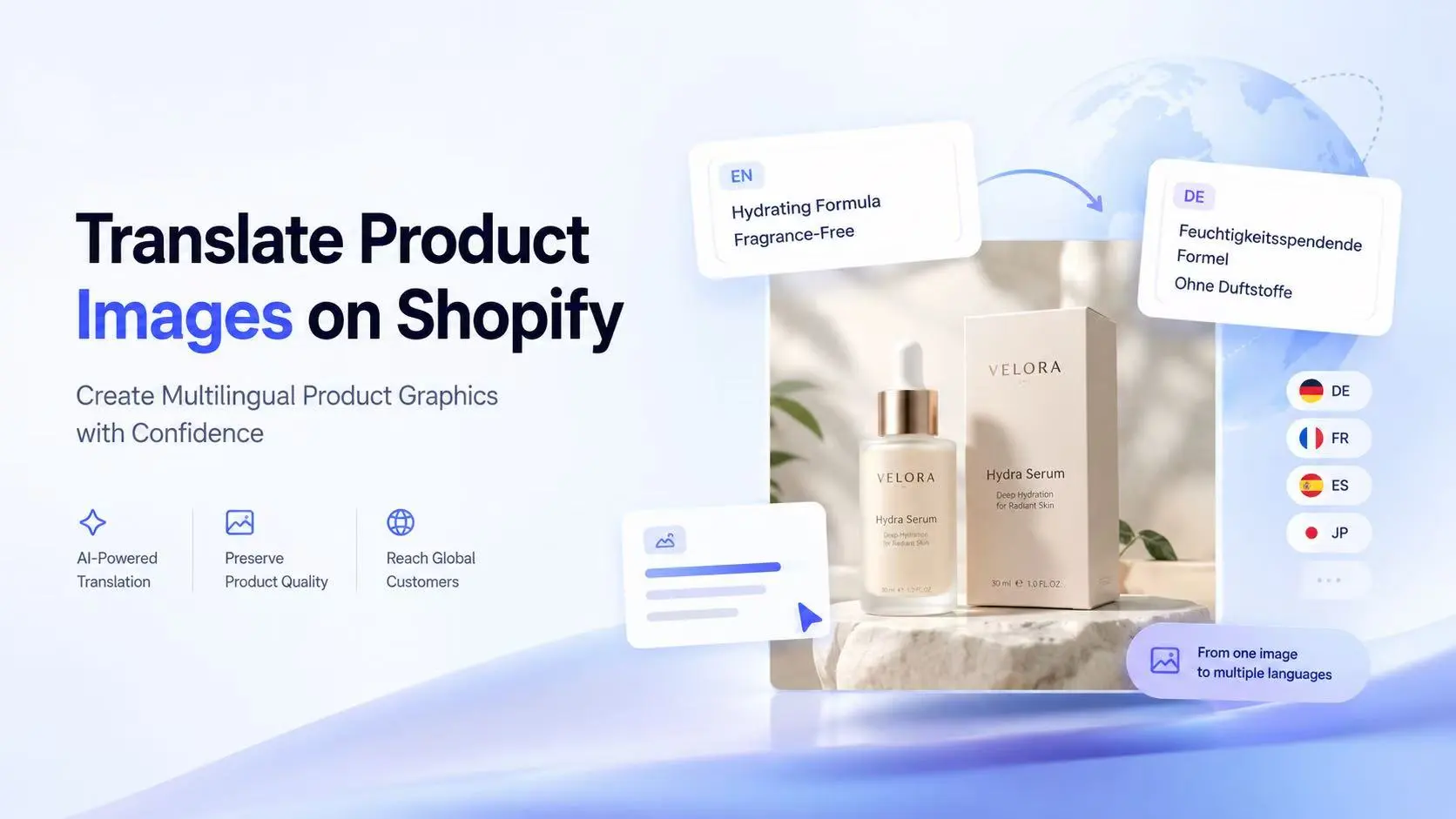
Translating your Shopify store text isn't enough. Learn how to translate text inside product images, infographics, and size charts to boost cross-border conversion.
How to Translate Product Images on Shopify for Different Languages
Expanding a Shopify store internationally takes more than translating product titles and descriptions. Your product images need to communicate clearly, too.
A skincare infographic might highlight a product's benefits in English. A clothing size chart might use unfamiliar measurement labels. An electronics graphic might explain features that shoppers in another country cannot easily understand. Even when your storefront text is translated, the words embedded in these images can remain unchanged.
This creates a gap between a multilingual storefront and the visual information customers use to make purchase decisions.
A practical Shopify product image translation workflow helps merchants localize text-heavy product graphics while preserving the product's appearance and essential information. The goal is not to translate every image indiscriminately, but to identify the images that need localization, create accurate language versions, and review them before publishing.

Can Shopify Automatically Translate Text Inside Product Images?
Not directly. Shopify's standard translation workflow can translate supported storefront content, but it does not automatically translate text embedded in product gallery image files. Text inside a JPG, PNG, or WebP image is part of the image itself rather than an editable product description.
Theme media and product gallery images can also follow different localization workflows. Therefore, translating your storefront text does not necessarily localize the words appearing in your product images.
For text-heavy product graphics, merchants generally have three options:
• Redesign images manually: Translate the text in the original design files and export localized versions.
• Upload translated assets: Prepare language-specific graphics and manage them through a compatible workflow.
• Use an image translation app: Translate text in product images with AI, review the results, and publish localized assets using the app's supported workflow.
The right choice depends on your product catalog, available design resources, target languages, and the type of images you need to localize.
Why Product Image Localization Matters
Product images communicate information that shoppers may need before they purchase. When important labels remain in the original language, customers can have difficulty understanding product benefits, comparing specifications, selecting the right size, or following usage instructions.
Consider an American skincare brand selling in Germany and France. Its product descriptions may already be translated, while the product gallery still displays English phrases such as:
• Hydrating Formula
• Suitable for Sensitive Skin
• Apply 3 Drops Daily
• Fragrance-Free
These labels should communicate the same information in the customer's language. Simply translating the text around the image does not solve the problem.
Image localization is particularly useful for:
• Fashion and apparel: Size charts, fit guides, material descriptions, and measurement diagrams.
• Beauty and personal care: Ingredient callouts, usage instructions, and product benefit graphics.
• Consumer electronics: Feature labels, port diagrams, and technical specification panels.
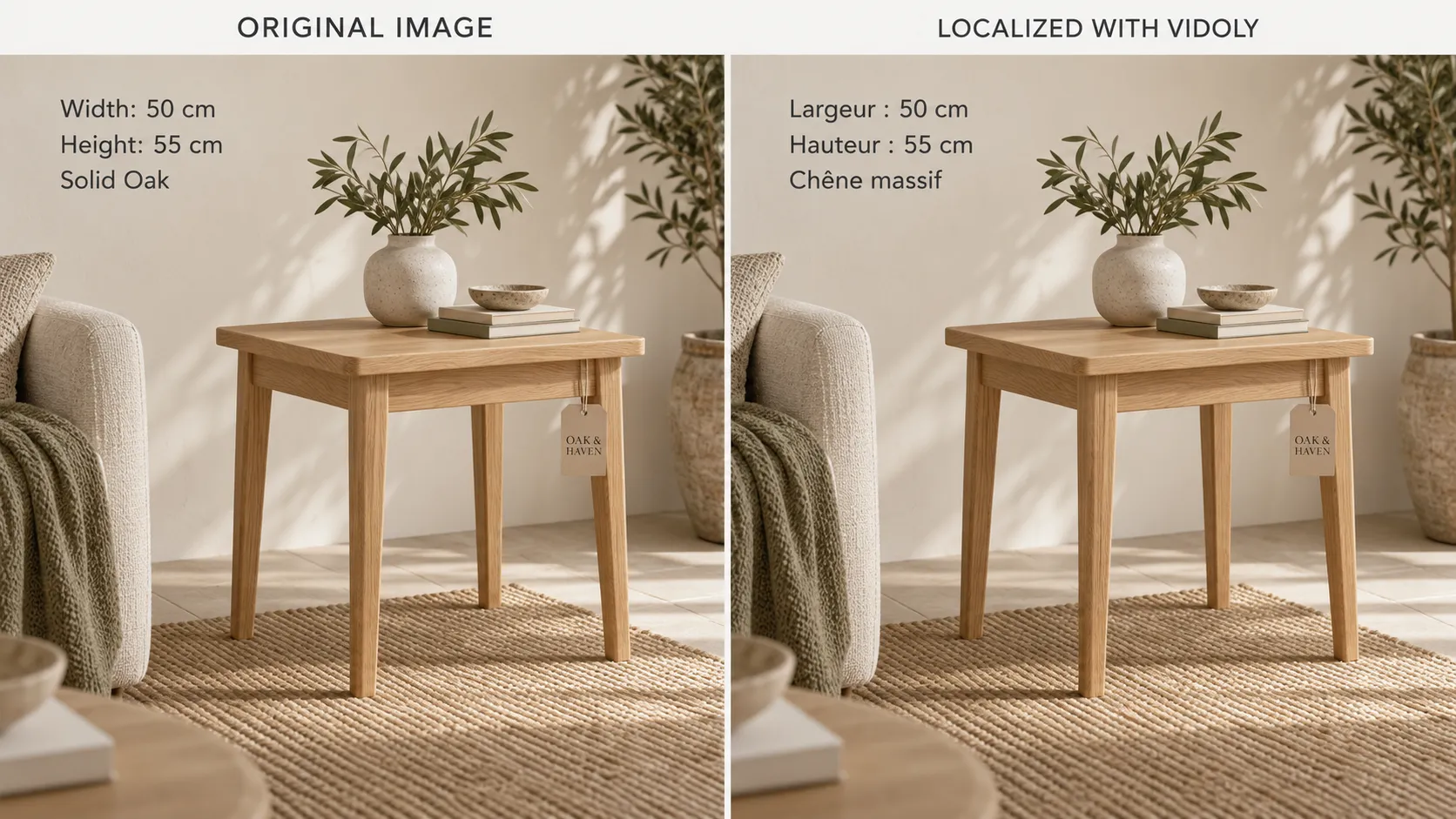
• Home and furniture: Dimension graphics, assembly steps, and care instructions.
• Promotional creatives: Discount banners, product comparison cards, and campaign messages.
Not every image needs a separate language version. Plain product photographs without language-dependent text can often remain unchanged. Prioritize images that communicate important product information.
Which Product Images Should You Translate First?
Start with graphics that have the greatest impact on product understanding. The following matrix helps you organize the work.
| Image type | Priority | What to verify |
|---|---|---|
| Size charts and measurement guides | Critical | Labels, values, units, and readability |
| Product infographics | High | Feature terminology and product claims |
| Instructional diagrams | High | Step order, warnings, and technical accuracy |
| Benefit and comparison graphics | High | Meaning and consistency of claims |
| Promotional banners | Medium | Offer wording, currency, dates, and conditions |
| Physical packaging photography | Conditional | Whether editing the image would misrepresent the delivered product |
Product infographics
Graphics containing labels such as "Fast Charging," "BPA-Free," or "Easy to Clean" are useful candidates for localization. Keep specifications, certifications, and product claims consistent with the approved source.
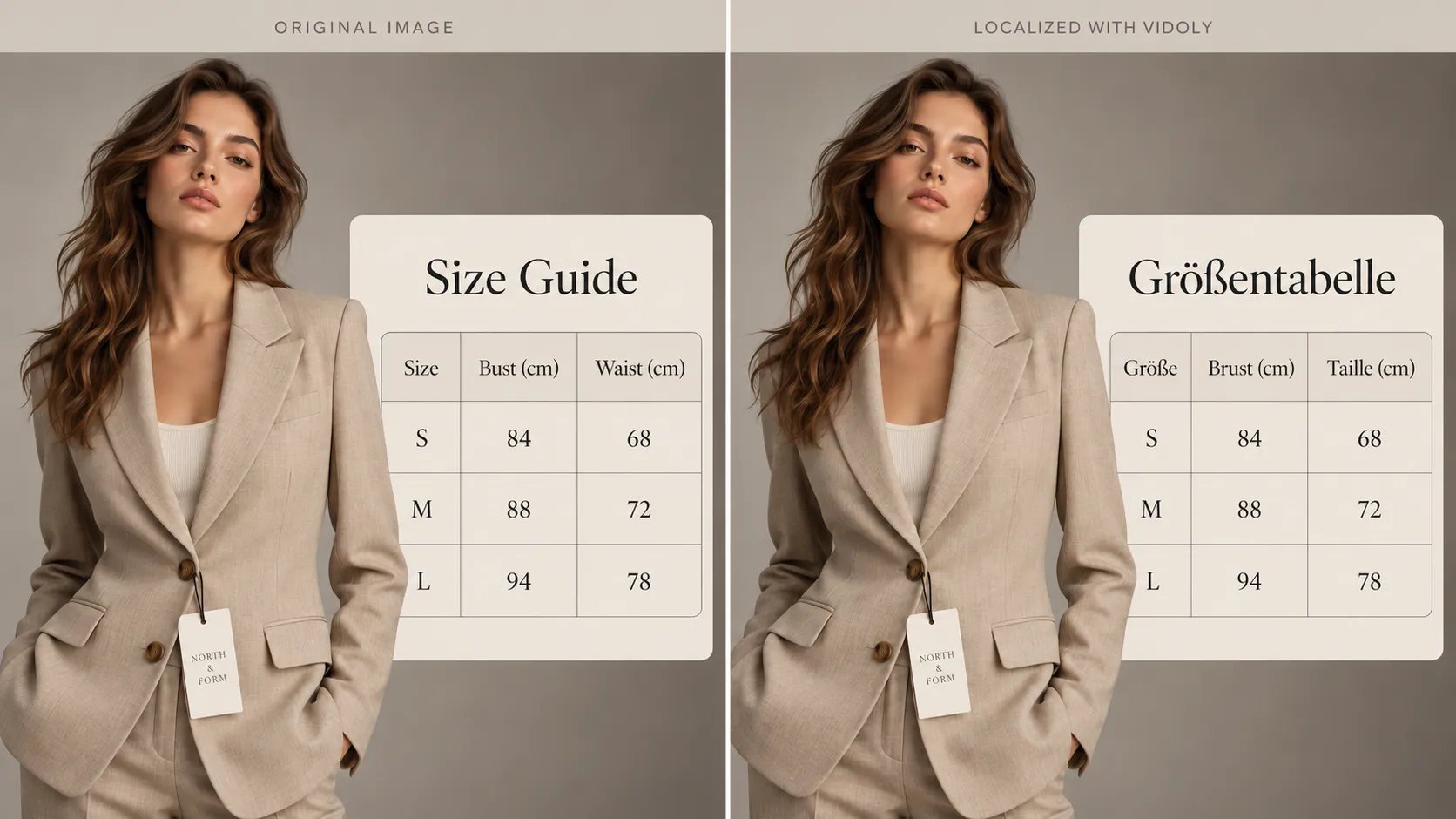
Size charts and measurement guides
Translate size labels and explanatory text, but do not casually change measurement values. If a unit conversion is needed, verify the converted value separately against the approved size data.
Instructions and product specifications
Instructions, care information, warnings, and technical labels require careful review. A fluent translation is not enough if it changes the meaning of a safety instruction or specification.
Promotional banners
Promotional copy often needs adaptation to sound natural in the target language. However, the promotion itself must remain accurate. Check eligibility, dates, currency, exclusions, and other conditions before publishing a localized version.
Physical packaging
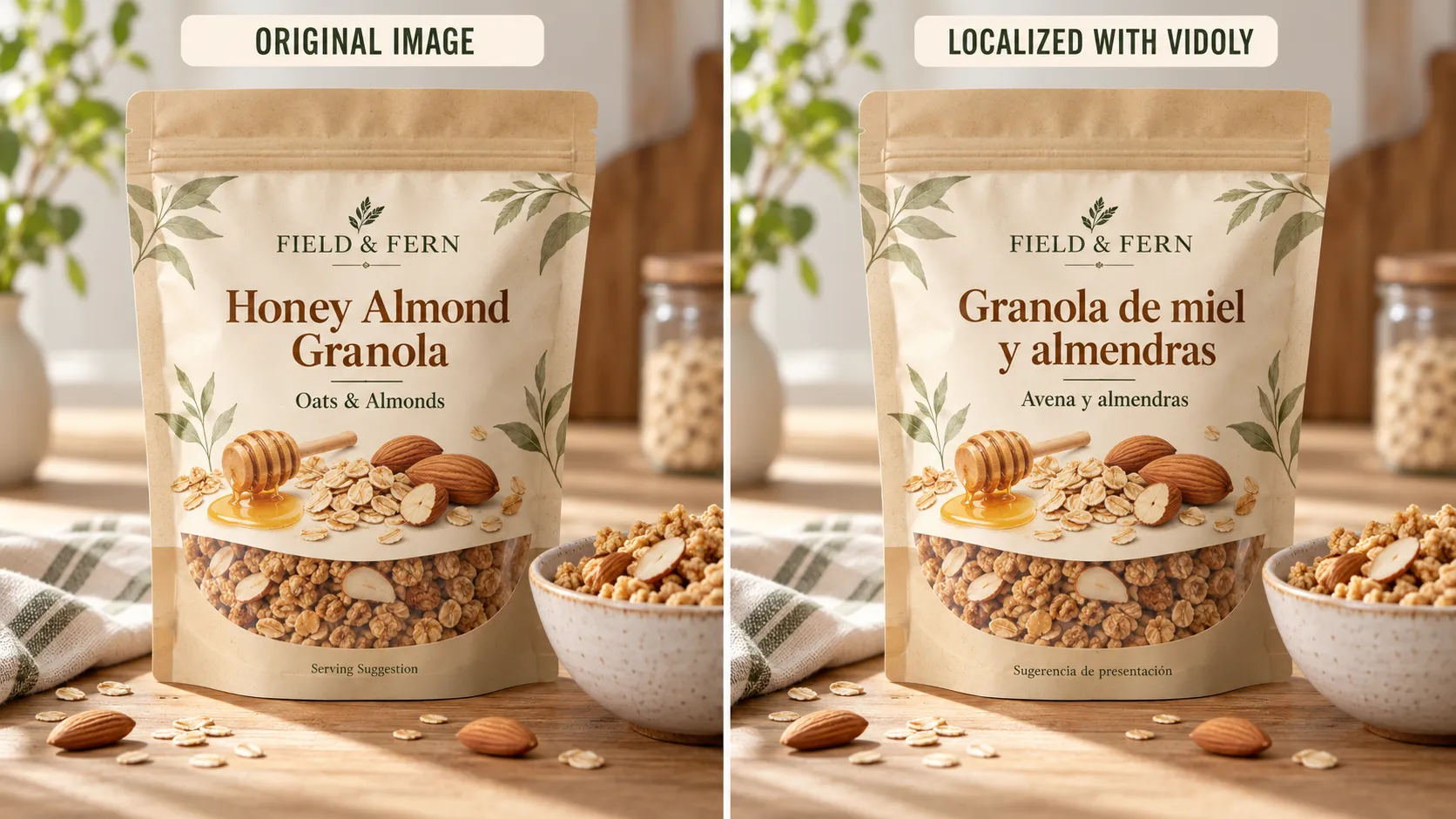
If an image shows the actual package a customer will receive, digitally changing the printed label could misrepresent the product. Keep the original packaging photography and use a separate localized infographic for translated explanations when necessary.
Three Ways to Translate Product Images on Shopify
Option 1: Redesign images manually
Open the original design file in Canva, Photoshop, Figma, or another design tool. Translate the text, adjust the layout, export the localized graphic, and organize the resulting assets by product and language.
Best for: Small catalogs, highly customized designs, and brands that need fine control over typography.
Trade-off: Every additional product and language adds design and quality-control work.
Option 2: Upload pre-translated images
A design team or localization partner can prepare the required graphics in advance. Merchants then manage the files through a workflow that supports the appropriate language-specific images.
Best for: Established brands with existing translation resources and strict design guidelines.
Trade-off: Asset organization, product mapping, version control, and storefront configuration all need to be managed carefully. Uploading multiple files alone does not guarantee that the correct image will appear for every language.
Option 3: Use a dedicated Shopify image translation app
A dedicated app offers a more repeatable approach when you need to process many text-heavy product images.
Vidoly Image Translator for Shopify supports AI translation of text in product images, uploading custom translated images, and reviewing and publishing localized assets while keeping original product images unchanged.
This approach is useful when a store needs a consistent process across multiple products and languages. It still requires review: AI-generated wording, text placement, specifications, and product claims should be checked before publishing.

How to Translate Product Images on Shopify: Step by Step
Step 1: Identify your target languages
Decide which markets you currently serve and which languages your storefront has published. Confirm the relevant store language configuration before preparing large batches of localized assets.
Start with a manageable number of languages and products. This makes it easier to establish a reliable process before expanding your catalog.
Step 2: Audit existing product images
Review your highest-priority product pages and identify the images containing embedded text.
Create a simple inventory that records the product, image type, source language, target language, and review status.
| Product | Image type | Source | Target | Status |
|---|---|---|---|---|
| Skincare A | Benefit infographic | English | German | To translate |
| Skincare A | Benefit infographic | English | French | To translate |
| Apparel B | Size chart | English | German | Needs review |
| Electronics C | Feature diagram | English | Japanese | To translate |
These are example inventory entries, not actual product records. Use your own SKU data and approved specifications when setting up the workflow.
Step 3: Create localized images
Choose manual design, pre-translated assets, or an AI-assisted workflow according to your needs.
With Vidoly Image Translator, merchants can use AI to translate text in product images or upload their own translated images. Follow the app's setup instructions and supported workflow for your store.
The separate AI image translator is also relevant for translating image assets used outside the Shopify product gallery, such as promotional graphics or other marketing visuals.
During translation, pay particular attention to five areas:
• Meaning: Keep the intended message and claim unchanged.
• Terminology: Use consistent product names, ingredient terms, material descriptions, and approved brand language.
• Numbers and units: Verify measurements, specifications, prices, and dates against the source.
• Layout: Ensure that translated text does not overlap the product or obscure important details.
• Language-specific formatting: Check spelling, accents, punctuation, line breaks, and character support.
Different languages require different amounts of space. Do not force longer translations into a layout that makes them difficult to read.
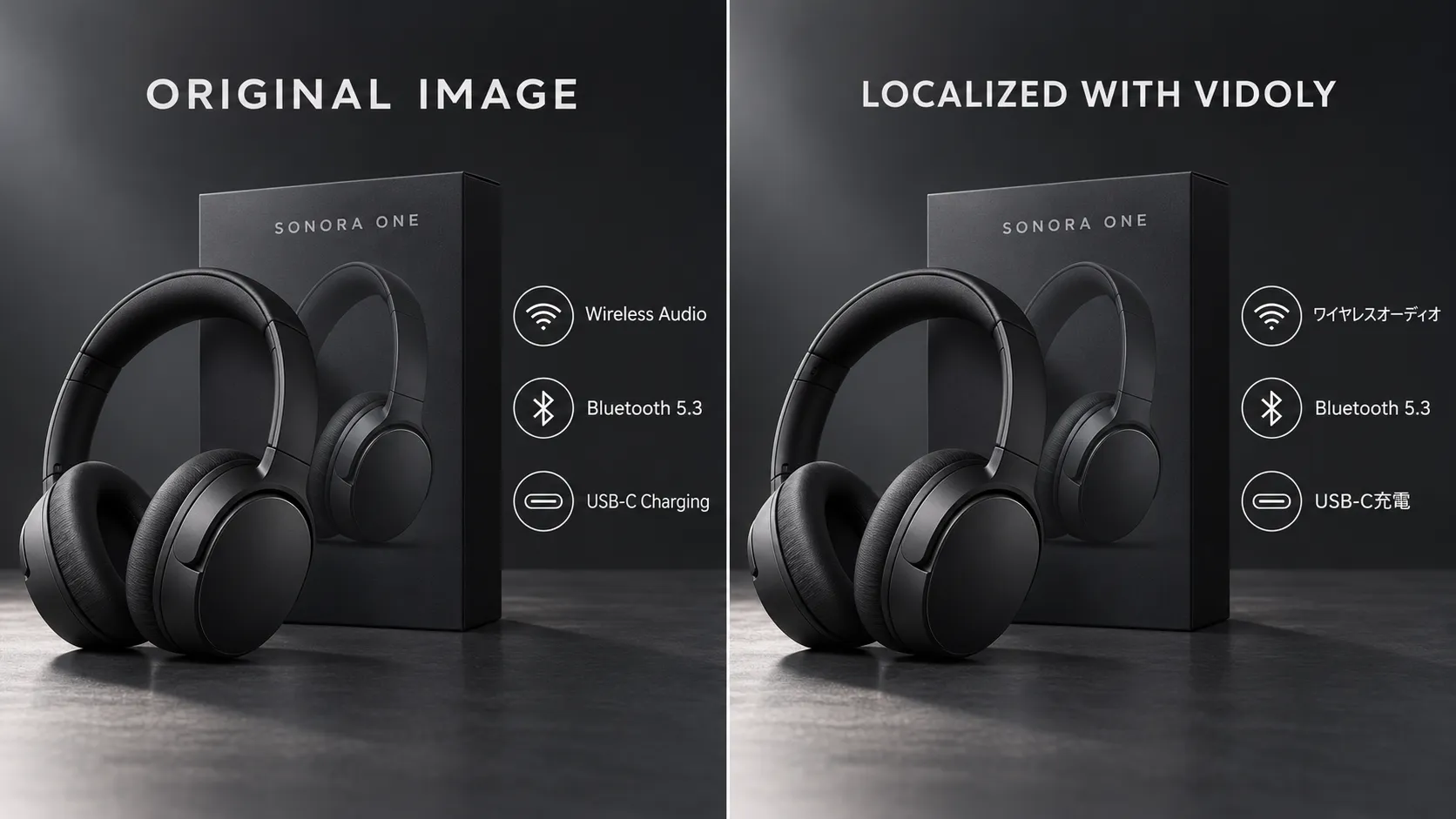
Step 4: Review the translated assets
Inspect each localized graphic before publication. Compare it with the approved source image and verify both the wording and the visual result.
Check that the translation sounds natural, the intended product claims remain unchanged, and the text is still legible at the image's actual display size. For a size chart or technical diagram, verify each number and label separately.
Where a custom translation or design correction is needed, prepare a corrected asset and review it again before publishing.
Step 5: Test the storefront
After publishing the localized assets using your chosen workflow, test representative product pages in each target language.
Confirm that the expected localized image appears, that the original product details remain correct, and that the image looks clear on both desktop and mobile.
Also check image zoom if your theme supports it. Test several products and templates rather than assuming that a successful result on one page proves the entire catalog is configured correctly.
Product Image Translation QA Checklist
Before rolling out localized product graphics, review these five areas.
1. Linguistic accuracy
Embedded text communicates the intended meaning. Product names and brand terms follow approved terminology. Instructions and warnings receive appropriate review.
2. Mobile readability
Text is legible at the actual mobile display size. Line breaks look intentional. Translated copy does not obscure product details.
3. Product and specification accuracy
Measurements, dimensions, prices, dates, and specifications match the approved source. Required unit conversions have been independently verified. Product claims have not become stronger or broader through translation.
4. Language matching
The correct localized asset appears for the language being tested. No outdated or unrelated language version appears. Missing-translation behavior has been tested rather than assumed.
5. Image quality
• Text remains sharp and readable.
• Cropping, colors, and product details remain consistent.
• Image zoom, if enabled, displays an appropriate high-resolution image.
Common Shopify Product Image Localization Mistakes
Translating only webpage text. A translated description does not automatically translate text embedded in a product image. Audit both written content and visuals.
Localizing images that do not need translation. Plain photography without language-dependent text often does not need a separate version. Focus on information-rich graphics first.
Publishing AI output without review. AI can produce awkward wording, incorrect terminology, or poor text placement. Check the final image, not just the translated words.
Changing product facts during localization. Never alter dimensions, ingredients, specifications, claims, or promotion conditions simply to make the translated design fit.
Treating image localization as an SEO guarantee. Clear localized graphics can improve the usefulness of a product page for international shoppers, but they do not guarantee better rankings. Search visibility still depends on the overall quality and accessibility of the localized store experience.
Frequently Asked Questions
Does Shopify automatically translate text inside product images?
Not directly. Shopify's standard translation tools do not automatically translate the text embedded in product gallery image files. These images need a separate localization process, such as manual design, pre-translated assets, or an image translation app.
How can I translate product images without redesigning them manually?
An AI-assisted image translation app can translate text embedded in images and help create localized versions. Vidoly Image Translator also supports uploading custom translated images. Review each result before publishing to verify the language, layout, and product details.
Do I need a separate product image for every language?
No. You should prioritize images containing text that shoppers need to understand. Plain product photographs without language-dependent wording may be reused across languages, depending on your store setup.
Should I translate physical product packaging?
Use caution. If the photograph represents the actual packaging customers will receive, digitally changing the printed text may misrepresent the product. Keep the original packaging image and use a separate localized graphic for translated explanations where appropriate.
Can translated product images be reviewed before publishing?
Vidoly Image Translator supports reviewing and publishing localized assets. Follow its current workflow, verify the text and image quality, and check the result on your live storefront before expanding the process to more products.
Prepare Your Shopify Product Images for International Shoppers
A multilingual storefront provides a more consistent shopping experience when its product images communicate in the same language as its descriptions and other storefront content.
You do not need to localize every image at once. Start with high-priority graphics, preserve approved product information, review every translation, and test the final storefront experience. Then expand the process to more products and languages as your business grows.
Ready to translate product images on Shopify with Vidoly Image Translator? Use AI-assisted image translation or upload custom translated assets, review the localized graphics, and build a repeatable workflow for your international store.
Reach international shoppers with localized product graphics.
Use AI-assisted image translation or upload custom translated assets, then review and publish a consistent multilingual storefront.
Try Vidoly Image TranslatorRelated Articles
Can Gemini Remove Image Backgrounds? We Benchmark Tested 6 Complex Scenarios
Can ChatGPT Really Do AI Virtual Try-On? We Tested It vs. Vidoly (With Real Examples)
How AI Replaces a Traditional Fashion Photoshoot: A Step-by-Step E-Commerce Case Study